What You Can Trade
Stocks
Trade equities from your signals: which brokers can run stocks, the fields a stocks strategy shows, short-selling on DAS, and the risk tools available.
Stocks are plain shares of a company, bought and sold on the exchange. A stocks strategy takes a buy or sell signal from the source you follow and places the matching equity order in your broker. Long buys shares, short sells them (only some brokers can short), and you size each trade in shares, dollars, or a percent of the account.
Which brokers can trade stocks
Five brokers run stocks. Set Instrument to Stocks in the strategy editor, then pick one on the Brokers tab.
| Broker | Notes |
|---|---|
| Tradier | Market or Limit entry, extended-hours orders, route to one account |
| Interactive Brokers | Market or Limit entry, extended-hours orders, route to one account |
| Charles Schwab | Market or Limit entry, extended-hours orders, route to one account |
| STG / DAS | Market only, short selling with a locate cap, route to one account |
| Robinhood | Market or Limit entry, route to one account |
Only STG / DAS can short. On every other stock broker a “short only” or “both” strategy still reads short signals, but the broker will only act on the ones it can place.
Set up a stocks strategy
Open the strategy editor from the Strategies page and set the instrument to Stocks. The full walkthrough (channel setup, filters, notifications) is on the Copy Trading Setup page. The fields below are the ones a stocks strategy shows.
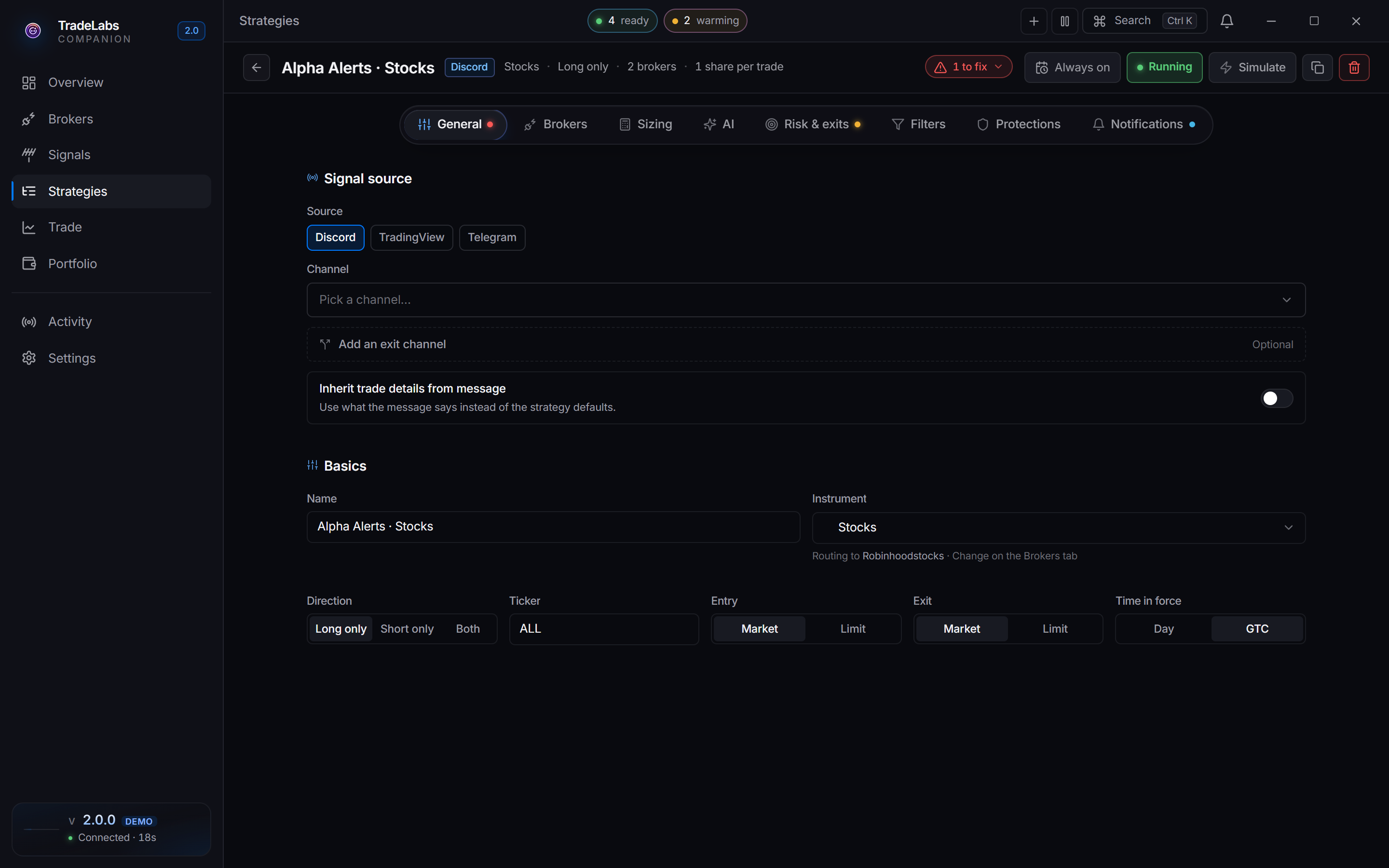
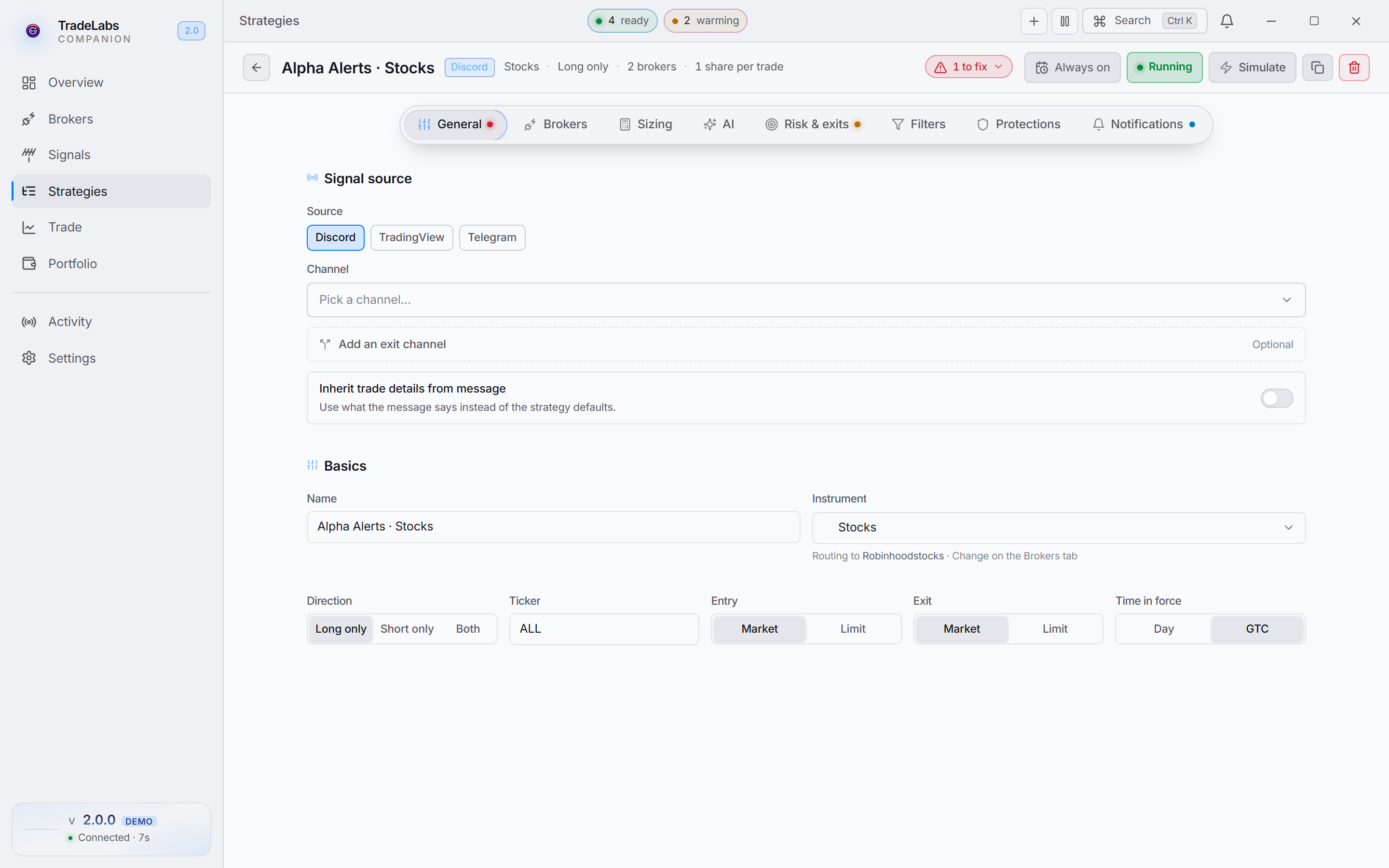 A stocks strategy in the editor. Shares and dollar sizing, no options fields.
Direction
Direction decides which signals the strategy acts on.
| Option | What it means |
|---|---|
| Long only | Only act on buy signals |
| Short only | Only act on sell or short signals |
| Both | Act on buy and sell signals |
Ticker
The Ticker field takes ALL to trade whatever symbol the signal names, or a specific symbol (or a comma-separated list like SPY, QQQ) to limit the strategy to those names.
Entry and exit
Entry and Exit are separate Market or Limit controls. Limit shows only on Tradier, Interactive Brokers, Charles Schwab, and Robinhood. STG / DAS is market-only. When a broker supports extended hours (Tradier, Interactive Brokers, and Schwab), an Allow extended hours toggle appears so orders can fill before and after the regular session. Schwab only accepts a Limit order outside regular hours, so pair the toggle with Limit there.
Size
Size is a number plus a unit: Shares, Dollars, or Percent. Dollars buys or sells that dollar value of shares; Percent resolves against a Percent sizing basis you choose — Available Funds (unused cash, which shrinks as trades fill) or Net Liquidation (cash plus open positions, which stays stable but may need margin).
Every stock broker here supports per-account routing, so with more than one account connected a Route to account picker appears under the broker grid. Leave it empty and the strategy uses the first available account.
Short selling on STG / DAS
Shorting runs through DAS Trader Pro, connected as STG Markets or Cobra Trading. On a stocks strategy routed to STG / DAS, one extra field appears:
- Short locate %: before a short, the broker locates shares to borrow, which carries a fee. This field caps the fee you will accept. Set it to
5and the short only goes through when the locate fee is 5% or lower; anything higher is skipped. It appears under a Broker routing group on the General tab, and only on a Stocks or RSA strategy routed to STG / DAS.
STG / DAS is built around one exit tool at a time — a take profit, a trim, or a trailing stop. The editor will let you set several, so pick the one you want and leave the rest empty.
Risk and exits
Stocks strategies carry the full set of risk tools. Each takes a percent (like 15%) or a dollar amount (like $0.50); leave one empty to skip it.
| Tool | What it does |
|---|---|
| Stop loss | Close the position if it drops this far |
| Take profit | Close the position if it gains this far |
| Trailing stop | Trail the price and close on a pullback of this size |
STG / DAS is the exception: set one of these, not several together.
Next steps
Connect a stock broker: Tradier, Interactive Brokers, Charles Schwab, Robinhood, or STG / DAS for shorting. Then start from ready settings with the Stocks template.