Brokers
Robinhood Chain
Connect a wallet to trade memecoins on Robinhood Chain: what the chain is, the private key and RPC URL, multiple wallets, fees, limits, and how to fix common problems.
Robinhood Chain connects through your own wallet, not a login. You paste a wallet private key and an RPC URL. The app then trades memecoins from that wallet on Robinhood Chain.
This page covers the wallet, the RPC URL and funding. For strategy settings, use the Robinhood Chain Memecoins template.
| What it trades | Supported |
|---|---|
| Memecoins on a launch curve or in a Uniswap pool | Yes |
| Coins paired with USDG or a stock token | Yes, when the strategy turns on paired coins |
| Stocks, options, spreads | No |
| RSA (reverse split arbitrage) | No |
Use a fresh wallet that holds only the money you trade with. A private key gives full control of the wallet. Never use your main wallet. The key is stored encrypted on this computer and is sent only to the Robinhood Chain broker process on this computer. It is never uploaded. The cloud dashboard receives only each wallet’s address and name.
What Robinhood Chain is
Robinhood Chain is an Ethereum layer 2 network. Its chain ID is 4663. Gas is paid in ETH, so the wallet needs ETH for every trade.
It is a separate network from Solana. A Solana wallet and a Solana key do not work here.
TradeLabs trades any memecoin on Robinhood Chain that has enough liquidity:
- Coins still on their launch curve. The Trade page shows the route as Launch curve.
- Coins in a Uniswap pool. This includes coins that graduated from a launch curve and any other coin with a Uniswap v2, v3 or v4 pool. The route shows as Uniswap pool. Each trade uses the pool that gives the best price.
Before a buy in a Uniswap pool, the app checks the coin. If a check fails, nothing is sent:
- Liquidity. The buy is refused when it would move the price more than 10%, or when selling the coins back would.
- Honeypot check. The app tests a buy and an immediate sell without sending anything. The buy is refused when that sell fails, or returns more than 30% less than the price says.
A sell is never refused for price impact, so you can always exit a position.
Many coins are paired with USDG or a Robinhood stock token instead of ETH. A strategy buys those only when you turn on Also buy coins paired with USDG or stock tokens. The buy then swaps ETH into the pair token first. See Paired coins below.
Before you start
You need three things:
- A wallet that can export a private key. MetaMask is one example.
- ETH on Robinhood Chain. ETH pays for the coins and for gas.
- An RPC URL. It is optional, but strongly recommended. A free Alchemy account works.
The Robinhood Wallet app shows a recovery phrase but no private key, so you cannot use it here. Create a new wallet in an Ethereum wallet app that can export a private key, such as MetaMask, and use that wallet only for the bot.
Get your wallet private key
These steps use the MetaMask browser extension.
-
Install MetaMask from metamask.io and click Create a new wallet. Write down the recovery phrase and keep it offline.
-
Open MetaMask. Click the account name at the top.
-
Click the three dots next to the account and choose Account details.
-
Click Private key and type your MetaMask password.
-
Press and hold Hold to reveal Private Key.
-
Copy the key. Paste it into TradeLabs in the next section.
On the MetaMask mobile app, tap the three dots next to the account, tap Private keys, type your password, and tap the copy icon. MetaMask’s own guide with screenshots is How to export an account’s private key.
Anyone with the private key can take everything in the wallet. Never share it, never paste it into a website or a chat, and make sure no one can see your screen when it is shown.
Get a free RPC URL from Alchemy
The RPC URL is how the app talks to Robinhood Chain. A free Alchemy account is enough for most people.
-
Go to alchemy.com and create a free account.
-
In the Alchemy dashboard, open Apps and click Create new app.
-
In Name, type a name, for example
TradeLabs bot. Click Next. -
On Choose chains, click the Robinhood Chain card. Click Next and finish creating the app.
-
Open the Endpoints page of the app. In the Robinhood Chain section, find Robinhood Chain Mainnet, not Testnet. Its Status must say Enabled. If it does not, click Enable.
-
Click the copy icon next to its HTTPS URL.
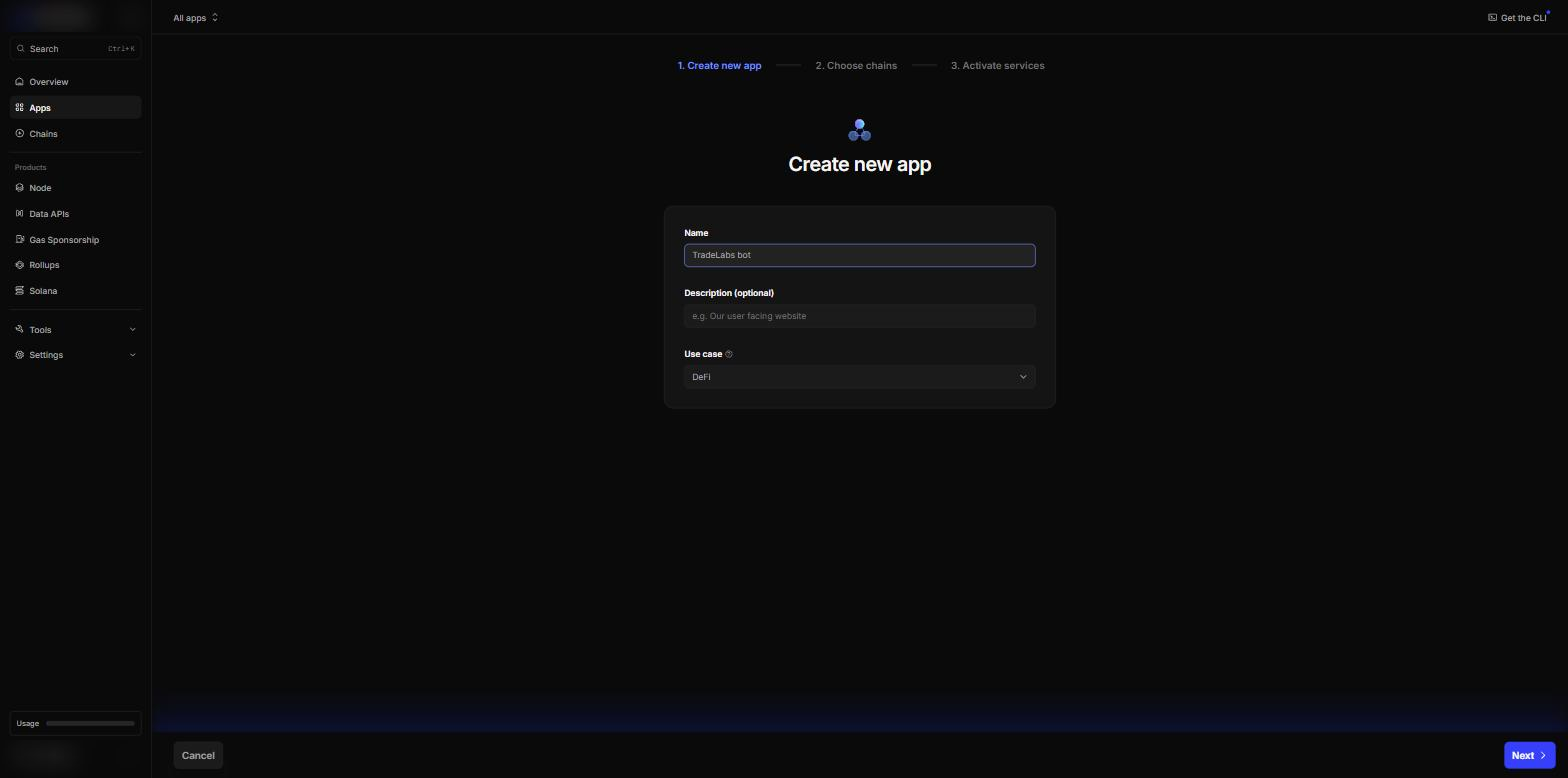 Step 3: name the app.
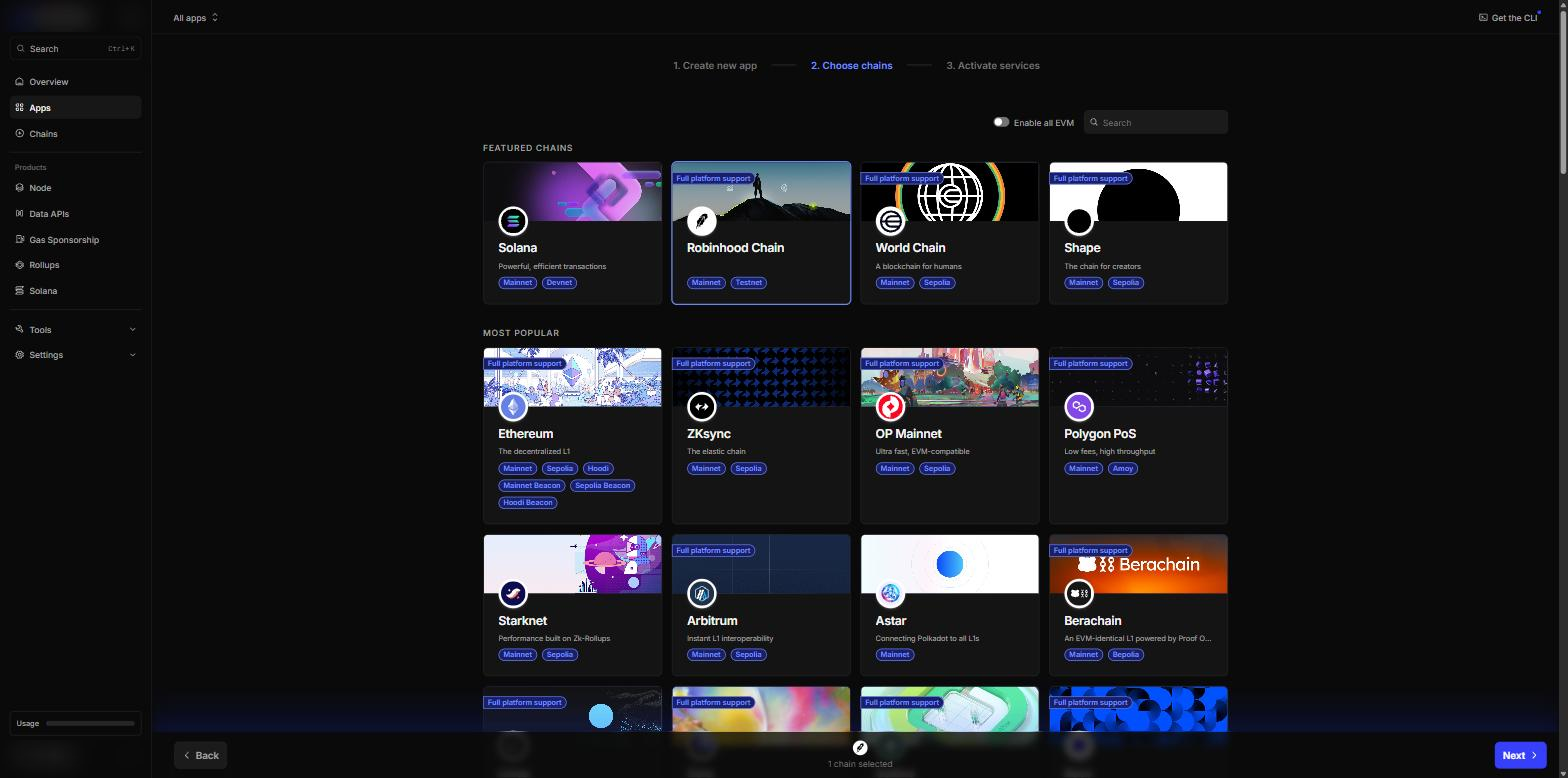 Step 4: pick the Robinhood Chain card.
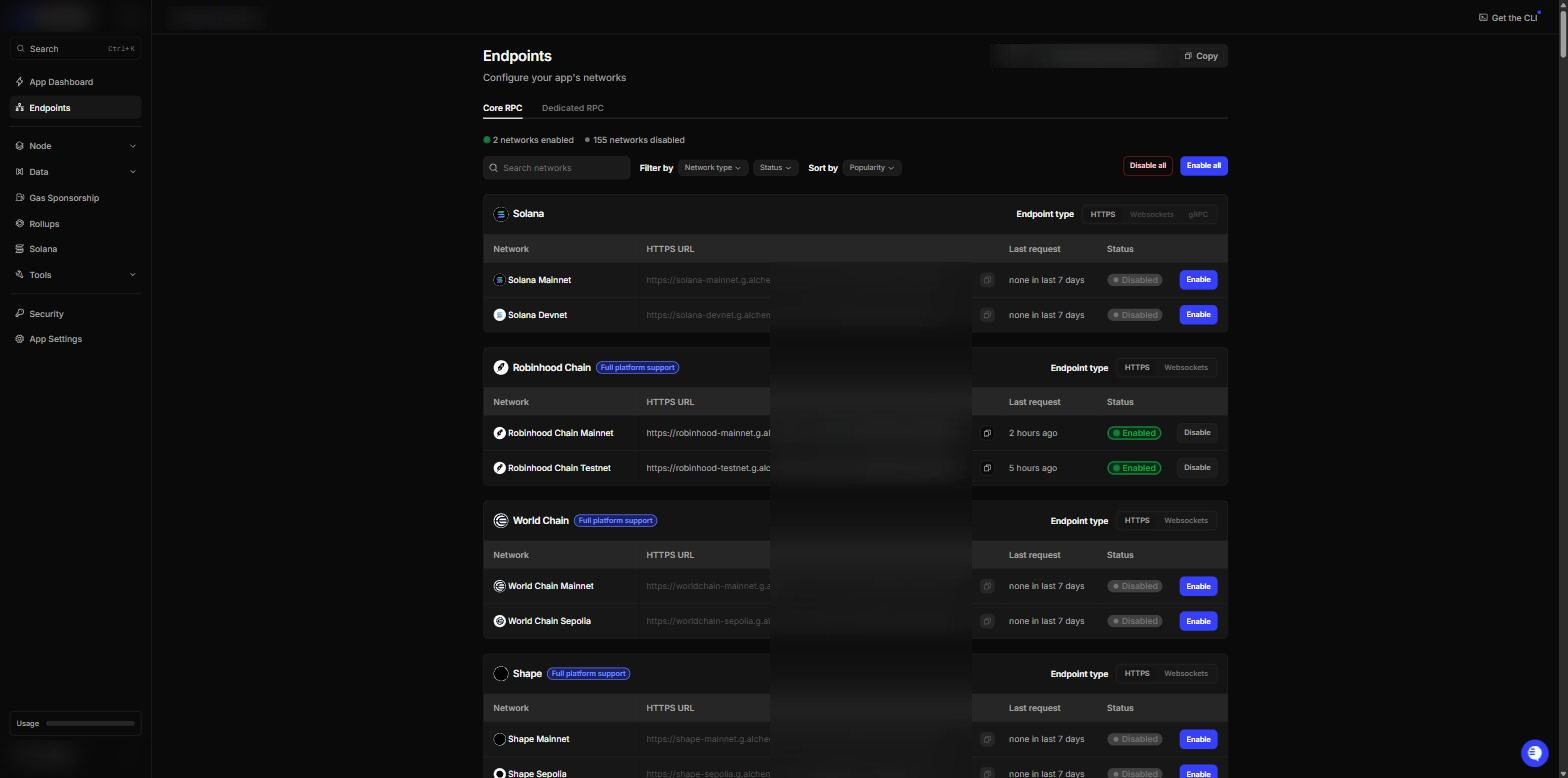 Steps 5 and 6: Robinhood Chain Mainnet must be Enabled. The key in the URL is hidden here.
Keep the URL private. The last part of it is your Alchemy key.
Connect it in the app
-
Open the Brokers page, find the Robinhood Chain card, and click Add account.
-
In Wallet name, type a name, for example
Main. It is optional. It helps you tell wallets apart. -
In Wallet private key, paste the private key you copied.
-
In RPC URL, paste your RPC URL, for example
https://robinhood-mainnet.g.alchemy.com/v2/your-key. If you leave it empty, the app uses the public Robinhood Chain RPC. -
Click Save account.
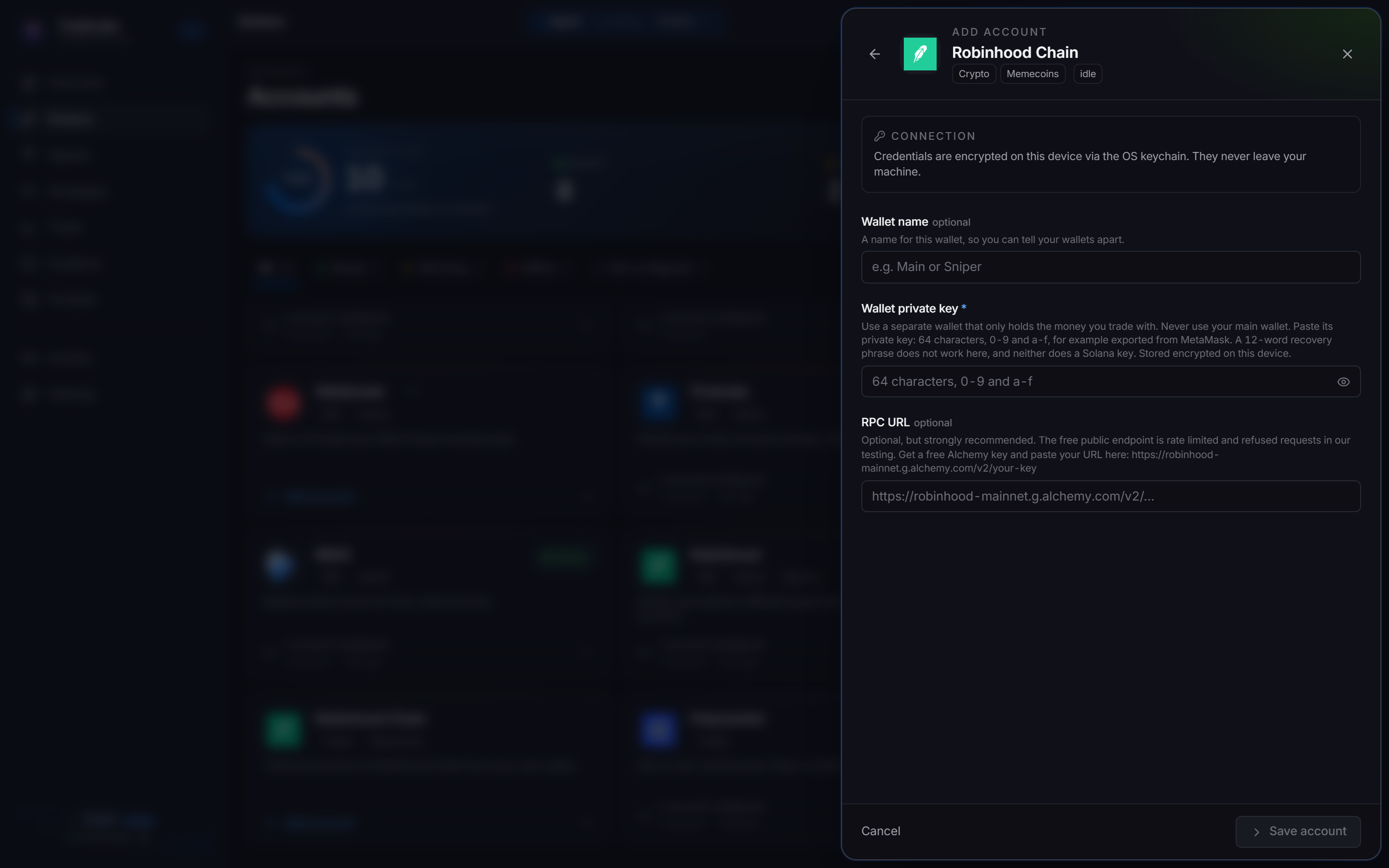
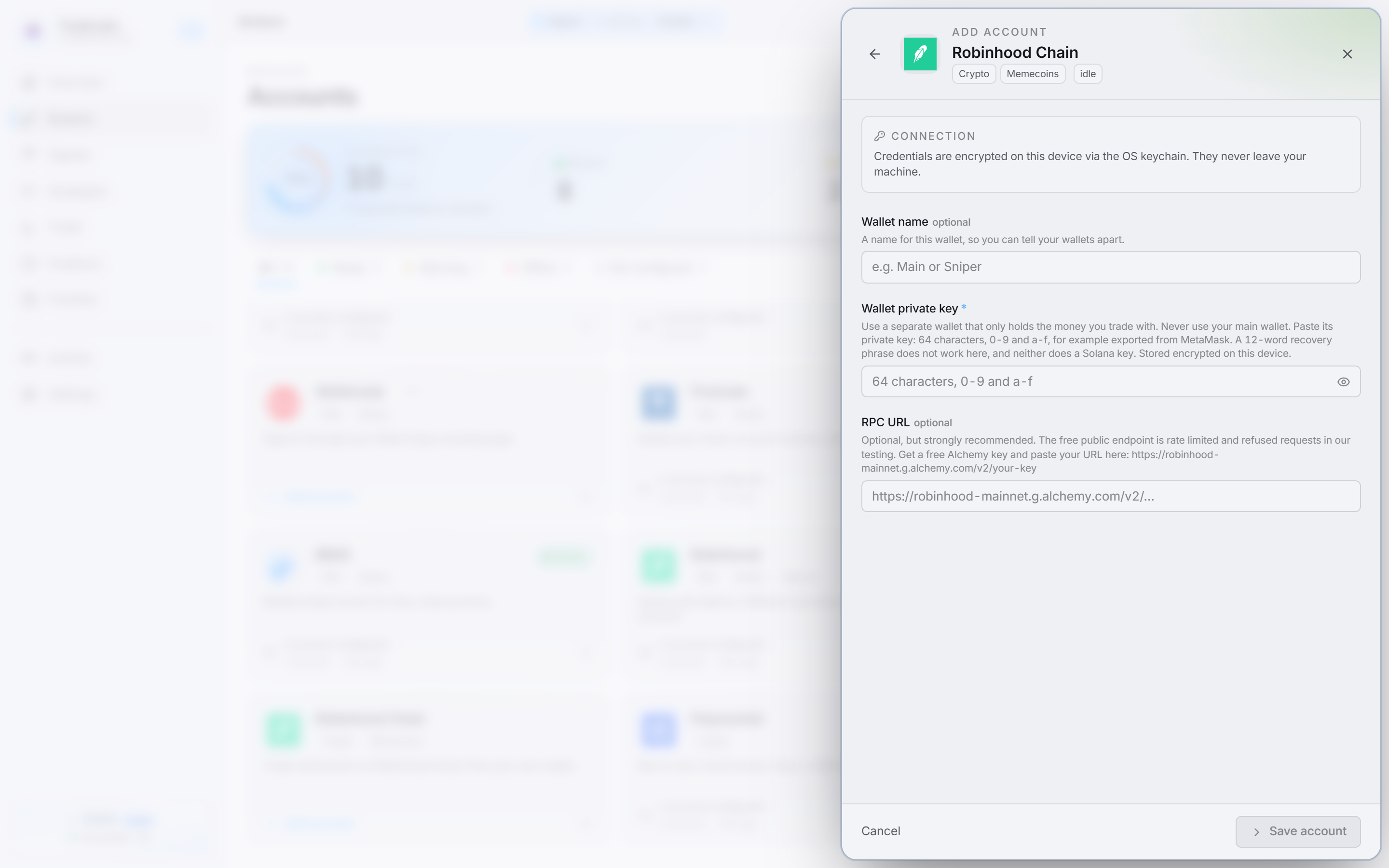 Wallet name, wallet private key and RPC URL. Only the key is required.
The key field checks what you paste:
- A 12 or 24 word phrase shows: “This looks like a recovery phrase. It does not work here.” Paste the private key of one wallet instead.
- A Solana key shows: “This looks like a Solana key. Paste the private key of an Ethereum wallet, such as MetaMask.”
Robinhood Chain is a wallet connection, so there is no captcha or verification code. Click Sign in on the account row and the app checks the key and the RPC. To check a saved wallet again later, open the ⋯ menu on the account row and choose Check connection.
A connected wallet shows Active or Idle on the broker card. Both are normal. If one wallet’s RPC stops answering, the app marks that wallet as down on its own, and your other wallets keep trading.
Fund the wallet with ETH
The wallet needs ETH on Robinhood Chain. ETH pays for the coins and for gas on every trade. Find the wallet address first:
-
Open the Trade page and choose Memecoins at the top right.
-
In the chain switch, choose Robinhood Chain.
-
Click the Swap tab.
-
If the wallet is empty, the Get ETH onto Robinhood Chain card shows its address. Click Copy address. If the wallet already holds something, click Deposit on the On Robinhood Chain card.
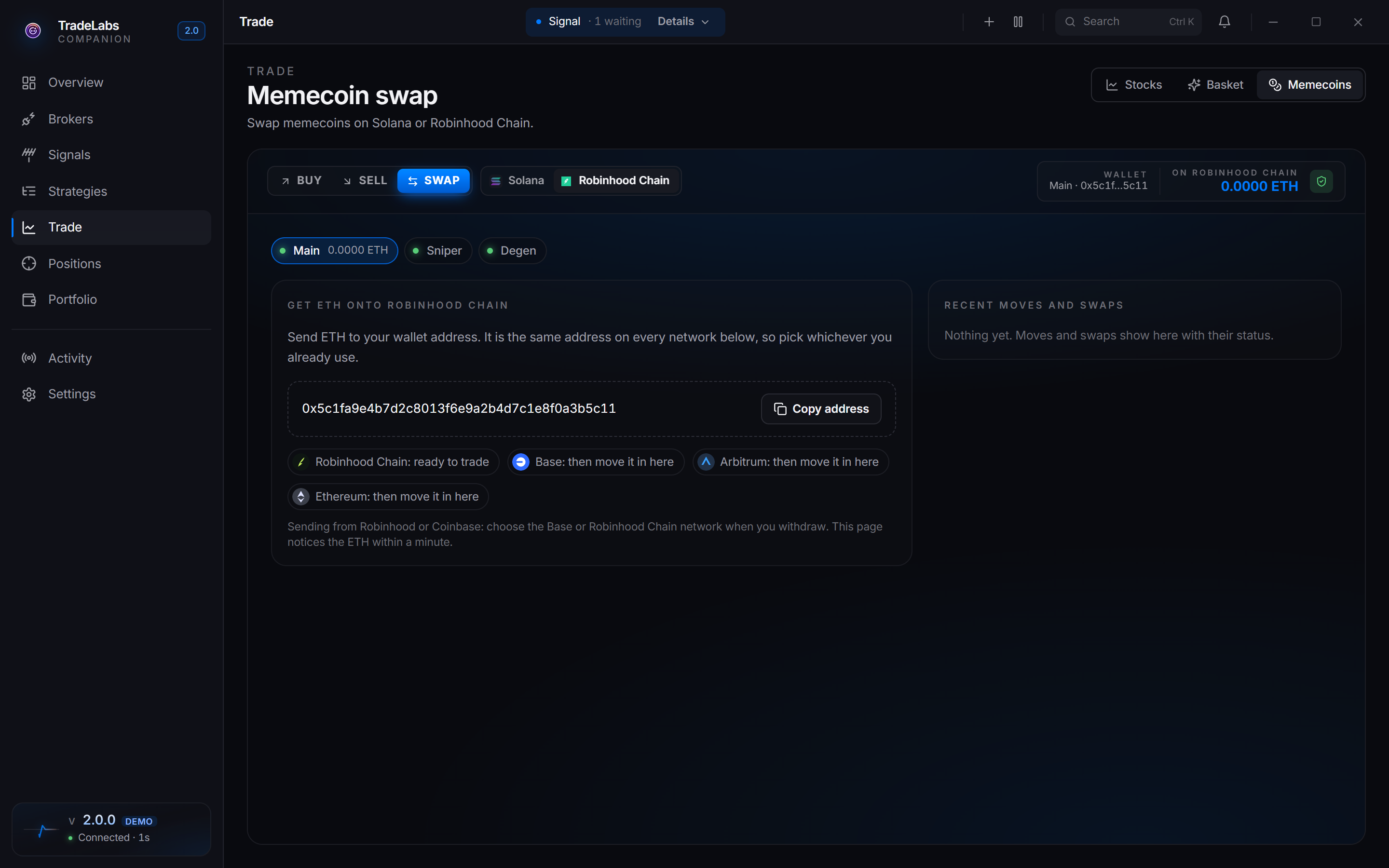
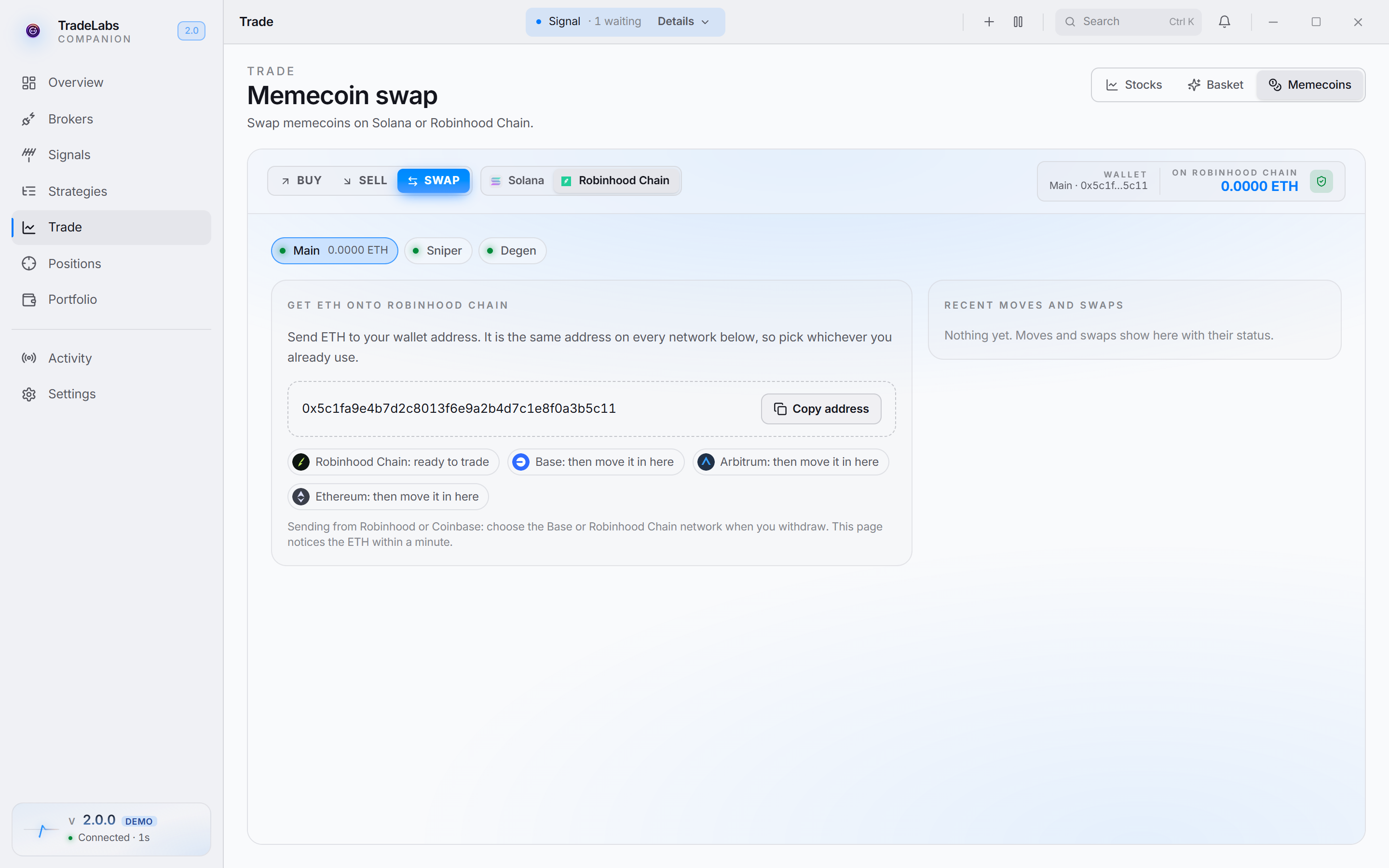 An empty wallet shows its address and the networks that work.
The address is the same on Robinhood Chain, Base, Arbitrum and Ethereum. Then use one of these three ways.
Send only on the networks the app lists: Robinhood Chain, Base, Arbitrum or Ethereum. Check the network before you confirm a withdrawal.
From an exchange
-
On your exchange, start a withdrawal of ETH.
-
Paste the wallet address.
-
Choose the Robinhood Chain network if the exchange offers it. If it does not, choose Base.
-
Confirm the withdrawal.
-
If you chose Base, move the ETH in from the Swap tab when it arrives.
The Trade page sees the ETH within a minute.
Move ETH in from Base, Arbitrum or Ethereum
Use this when the same address already holds ETH on Base, Arbitrum or Ethereum.
-
On the Swap tab, find the Your ETH on other networks card. It lists the ETH the address holds on each network.
-
Click Move in on the network to move from. The swap box fills in with ETH on that network.
-
Type the amount, or click MAX.
-
Wait for the price, then click Move … ETH to Robinhood Chain.
-
Read the confirm box. It shows how much ETH arrives, when, and the fee. Confirm to send.
-
Watch the progress card. You can leave the page. The arrival shows in Activity and in your balance.
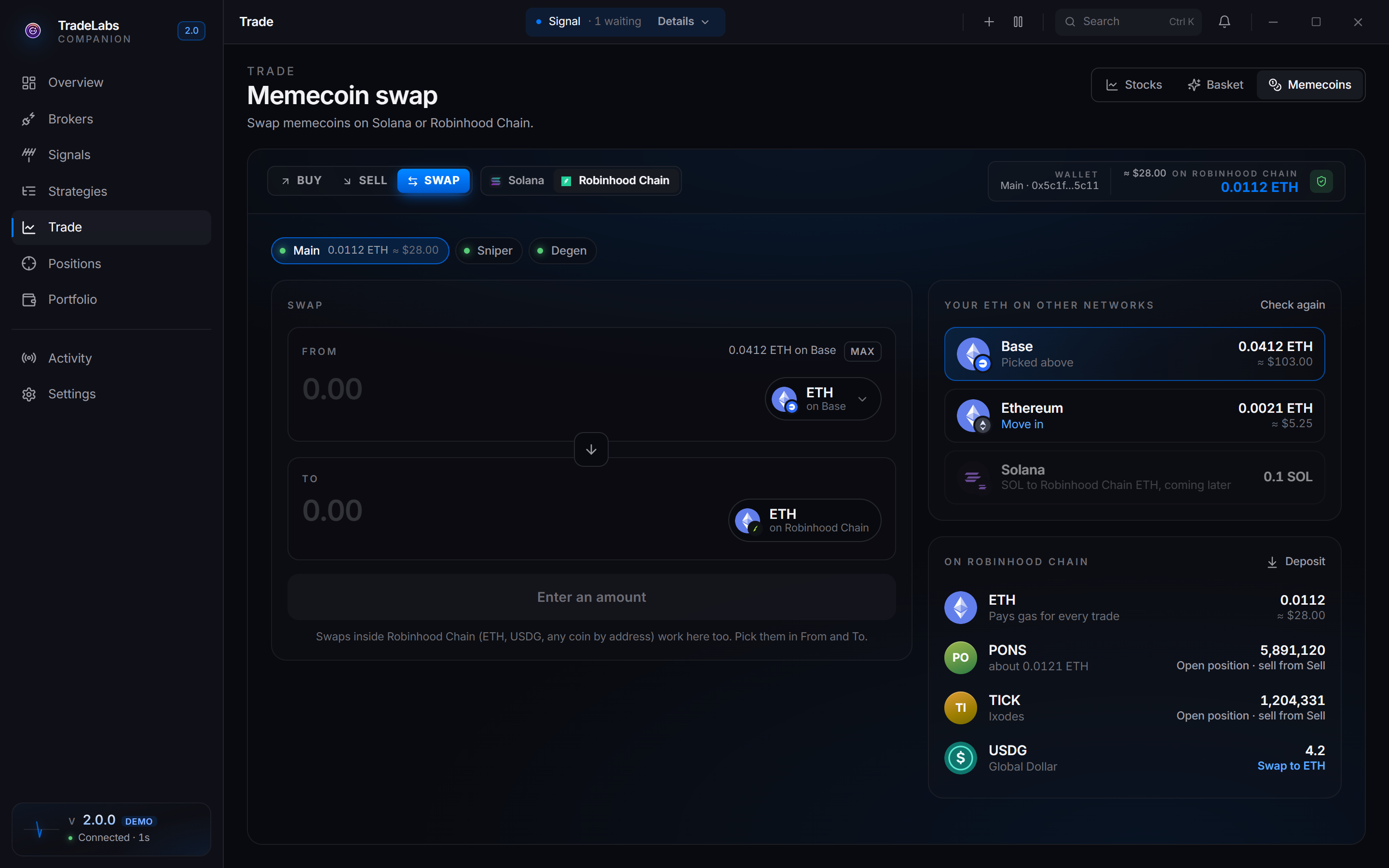
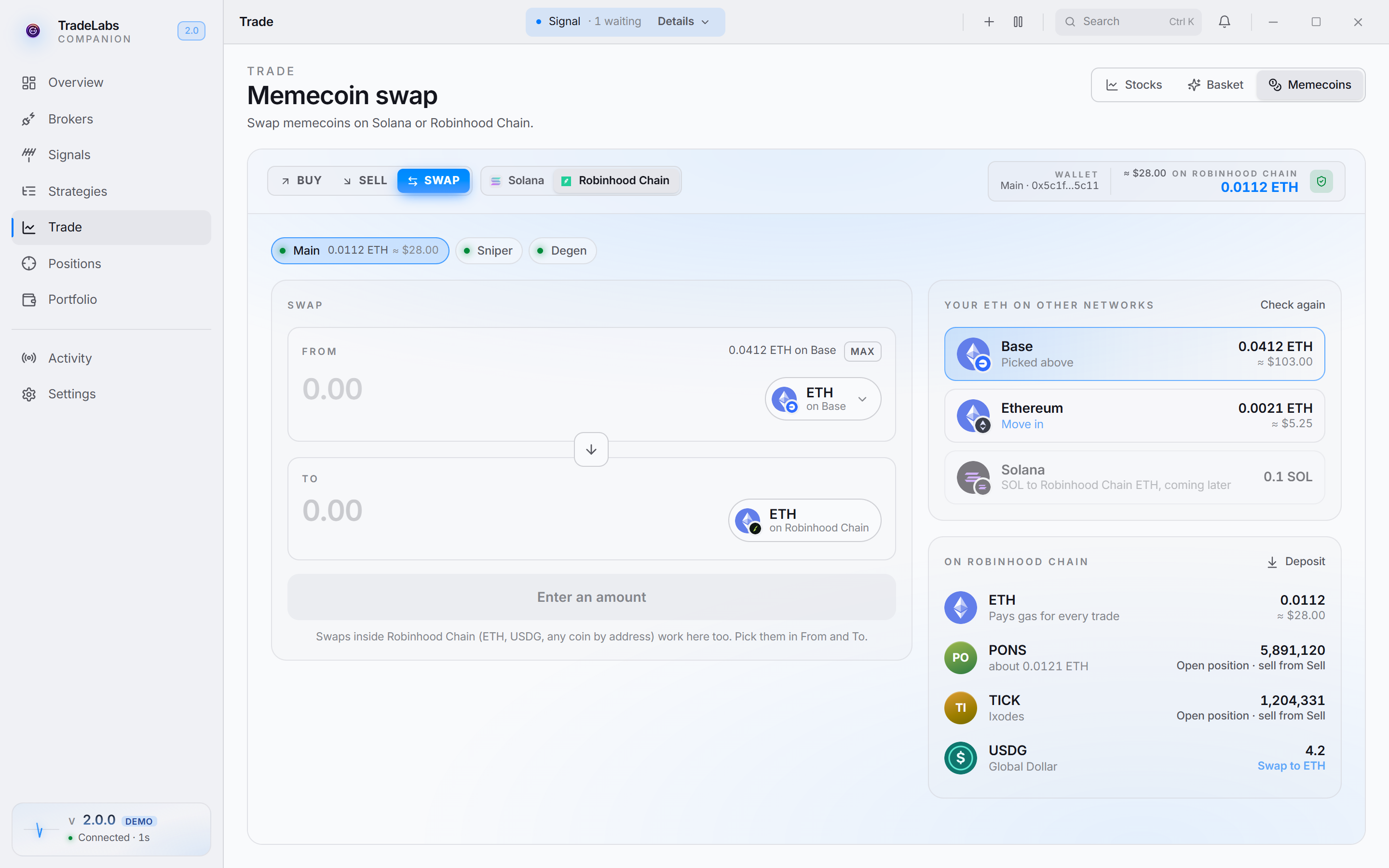 The Swap tab finds ETH on other networks at the same address.
The move goes through the Relay bridge. The app refuses a move under 0.001 ETH. It also refuses a move when the bridge fee is more than 2% of the amount or more than $1. Nothing is sent in that case.
From another wallet
-
Open the wallet that holds your ETH.
-
Send ETH on the Robinhood Chain network to the address you copied.
-
Wait for it to show on the Swap tab.
To test the wallet with a tiny buy and sell, see Test with a tiny trade.
Multiple wallets
Each account on the Robinhood Chain card is one wallet.
| Plan | Wallets |
|---|---|
| RSA+ | Up to 5 |
| Copy Trading | 1 |
If you save more wallets than your plan allows, the extra wallets stay saved but do not trade.
Each strategy picks its wallets on its Brokers tab:
- All wallets trades every wallet, including wallets you add later.
- Tick one or more wallets to trade only those.
Each picked wallet buys the full strategy size. Two wallets with a size of 0.01 ETH spend 0.02 ETH in total. A wallet shows its address in the list after it connects once.
RPC URL
The RPC URL is how the app talks to Robinhood Chain.
- Empty: the app uses the public Robinhood Chain RPC. It is rate limited and slower. Robinhood’s own documentation says it is not for production use.
- Your own URL (recommended): a private RPC from a provider such as Alchemy. Alchemy’s Robinhood Chain mainnet URL looks like
https://robinhood-mainnet.g.alchemy.com/v2/your-key.
You only need to paste the URL once. Every wallet without its own RPC URL uses the first RPC URL set on any wallet.
Your RPC URL contains your API key. The broker log shows only the start of the address, not the key.
How much of a free plan the bot uses
Alchemy’s free plan includes 30 million compute units a month and 25 requests a second (alchemy.com/pricing, checked September 2026).
Check the usage after the first day, and again when you have many open positions. To see your real usage, open your app in the Alchemy dashboard, click App Dashboard, then App Metrics. The Usage bar at the bottom left shows how much of the month’s compute units you used.
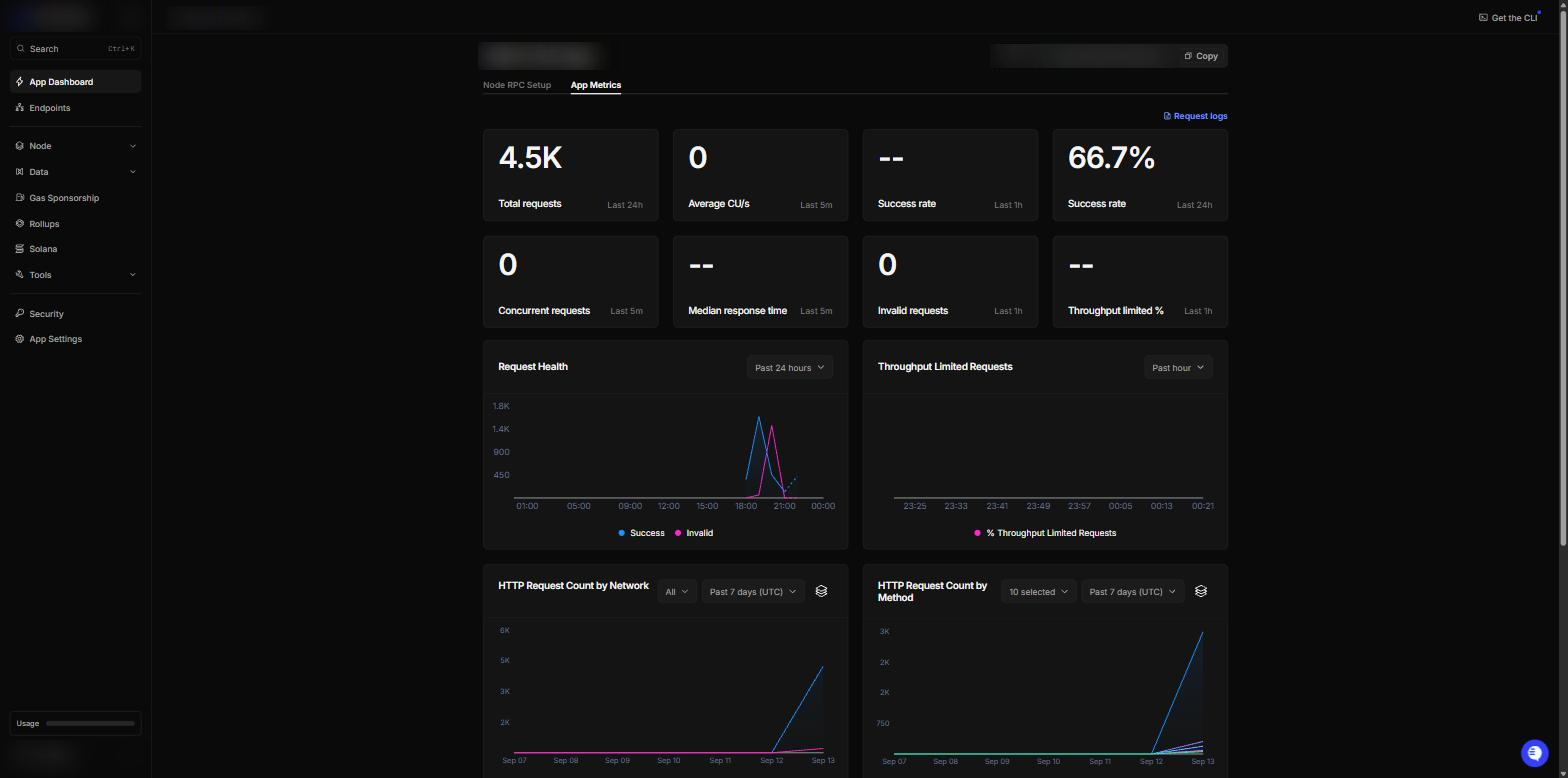 App Metrics shows requests, compute units per second, and rate-limited requests.
If the monthly total is close to the limit of your plan, close positions you do not need, or upgrade the Alchemy plan.
Fees and costs
- Gas. Every transaction pays gas in ETH.
- Trading fee and creator tax. A coin that started on a launch curve pays a trading fee plus the coin creator’s tax, if the creator set one, on every buy and sell. The rate differs from coin to coin, and it stays the same after the coin moves to a Uniswap pool.
- Pool fee. Any other coin pays the fee of its Uniswap pool. Each pool sets its own fee, often 0.3% or 1%.
- Launch tax. Right after a coin launches, it charges a high launch tax that drops within seconds. A buy waits up to 6 seconds for it to fall to the strategy’s Max launch tax (1% by default). If it is still higher, nothing is sent.
- Paired coins. The swap into the pair token and back, plus gas, costs extra. The strategy refuses a buy when that extra cost is above Max extra cost.
- Moving ETH in. Moving ETH from Base, Ethereum or Arbitrum pays a bridge fee. The app refuses a move when the fee is more than 2% of the amount or more than $1.
Paired coins
Turn on Also buy coins paired with USDG or stock tokens on the strategy’s Sizing tab to buy these coins.
- A paired buy swaps ETH into the pair token first, then buys the coin. It takes 3 transactions.
- Max extra cost is the most the swap there and back plus gas may cost, as a share of the buy. The default is 3%.
- Use USDG or stock tokens already in the wallet spends the pair token you already hold before swapping ETH. It never spends more than the buy size. It is on by default.
- A sell of a paired coin returns ETH.
Coin filters
The strategy’s Coin filters tab sets what a coin must look like before the bot buys it. Blank is no filter. Before each strategy buy the bot reads the coin from the chain and skips the buy when it fails a filter. The skip names the number it read, for example “PEPE’s market cap is $12.4K, below your minimum of $50K”. Manual buys from the Trade page ignore the filters.
| Filter | What it reads |
|---|---|
| Market cap | The coin’s price times its total supply, in dollars, the way the launchpad shows it. |
| Holders | Wallets holding the coin, the number the block explorer shows. The explorer runs a few minutes behind the chain. When it does not answer, the bot counts from the coin’s own transfers instead, which works for coins with up to about 10,000 transfers; a busier coin is then skipped with that reason. |
| Age | Minutes since the coin was created. |
| Creator tax | The tax the coin’s creator takes on every buy and sell. Needs a coin that started on a launch curve. |
| Creator holds | The share of the total supply in the creator’s wallet. Needs a coin that started on a launch curve. |
| Top 10 wallets hold | The share of the total supply in the 10 largest wallets, not counting contracts such as the launch curve or the pool. From the explorer’s holder list, like the holder count. |
A filter whose fact cannot be read skips the buy rather than ignoring the filter. The check adds well under a second to a buy on a young coin.
Limits
| Limit | Value |
|---|---|
| Buy size | An amount of ETH per wallet. A size in dollars or percent is refused. |
| Slippage tolerance | 5% by default, for buys and manual sells. Automatic exits accept up to 15%. |
| Max launch tax | 1% by default. A buy waits up to 6 seconds for a new coin’s launch tax to fall to this. 99 buys right away. |
| Coin filters | Off by default. Holders and top 10 wallets come from the block explorer, a few minutes behind the chain. |
| Wallets | 1, or up to 5 on RSA+ |
| Signal source | Discord or Telegram |
| Waiting for the broker | A strategy buy waits at most 15 seconds for the broker to be ready. After that it is skipped. |
| Duplicate protection | When on, a repeat buy of the same coin in the same wallet is blocked for 2 minutes |
| Moving ETH in | At least 0.001 ETH. The bridge fee must be 2% or less, and $1 or less. |
| Automatic exits | Run only while the app is running |
How sells work
Keep coins you want to hold long term in a different wallet. A sell alert for that coin sells them too.
Fixing common problems
- “This looks like a recovery phrase”: you pasted the 12 or 24 words. Export the private key of one wallet instead.
- “This looks like a Solana key”: you pasted a Solana wallet key. Use an Ethereum-style wallet such as MetaMask.
- Skipped: “is not a Robinhood Chain coin address”: the alert named a Solana address, or no address. A Robinhood Chain coin address is
0xfollowed by 40 characters. - Skipped: “the buy size … is in dollars” or “is a percent”: set the strategy’s buy size to an ETH amount, for example
0.01. - Skipped: “this wallet already holds …”: double-down protection is on and the wallet already holds that coin.
- Skipped: “a duplicate buy within 2 minutes is blocked”: duplicate protection is on and the same wallet bought, or is still buying, that coin.
- A buy was skipped because the broker was not ready: a strategy buy waits at most 15 seconds for the broker, then skips. Check the Robinhood Chain card on the Brokers page.
- Skipped: “No pool with enough liquidity for this coin on Robinhood Chain”: the coin has no pool, or its pool is too small for the buy size. Try a smaller buy size.
- Skipped: “selling this coin would fail or lose most of its value (honeypot check)”: the test sell failed or lost too much. The coin can block or tax sells. Nothing was sent.
- “Trading on this coin is closed”: the coin’s launch closed and it has no pool to trade in.
- “This coin trades against USDG, not ETH”: turn on Also buy coins paired with USDG or stock tokens on the strategy’s Sizing tab.
- “You do not own this coin”: the sell named a coin the wallet does not hold. Nothing was sent.
- A sell alert sold coins you bought yourself: a sell alert sells everything the wallet holds of that coin. Keep the bot’s wallet separate.
- A move from Base, Arbitrum or Ethereum was refused: the amount was under 0.001 ETH, or the bridge fee was over 2% or over $1. Try a larger amount.
- “The trade was sent but its result is not confirmed yet”: the transaction was sent, but the RPC did not confirm it in time. Open Activity and check the trade before you try again.
- Not enough ETH: every trade needs ETH for gas on top of the amount. Add ETH to the wallet.
- Slow trades or rate-limit errors: add a private RPC URL. If you already use one, check the
rpc usagelog line for rate-limited calls and your plan’s monthly total. - Exits did not fire: exits run inside the app. Keep the app running on a computer that is on and online.
Using Robinhood Chain with a strategy
Create a memecoin strategy, pick Robinhood Chain on its Brokers tab, and choose its wallets. The Robinhood Chain Memecoins template gives every setting and shows how the exits work together. The Memecoins page covers the fields a memecoin strategy locks.