What You Can Trade
Prediction Markets
Trade prediction markets on Polymarket: what they are, the one broker that trades them, and how to set up a Yes/No strategy with stop loss and take profit.
Prediction markets let you take a position on the outcome of a real-world event, like an election, a sports result, or an economic release. Instead of buying a share of a company, you buy a Yes or No position on a question. If the outcome matches your side, the position settles in your favor.
TradeLabs trades prediction markets on Polymarket, which runs on Polygon and settles in USDC.
Which broker trades them
Prediction markets trade on Polymarket only. When you set a strategy’s instrument to Prediction Markets, the broker is Polymarket and the editor hides the fields that do not apply.
| Broker | Trades prediction markets |
|---|---|
| Polymarket | Yes |
| Every other broker | No |
Polymarket connects with a Polygon wallet private key, not a username and password. Set it up first on the Polymarket broker page so the strategy has an account to route to.
Setting up a strategy
Open the editor from the Strategies page and set the Instrument to Prediction Markets on the General tab. That routes the strategy to Polymarket and changes a few controls to match how prediction markets work. For the full walkthrough of every tab, see the strategy editor guide.
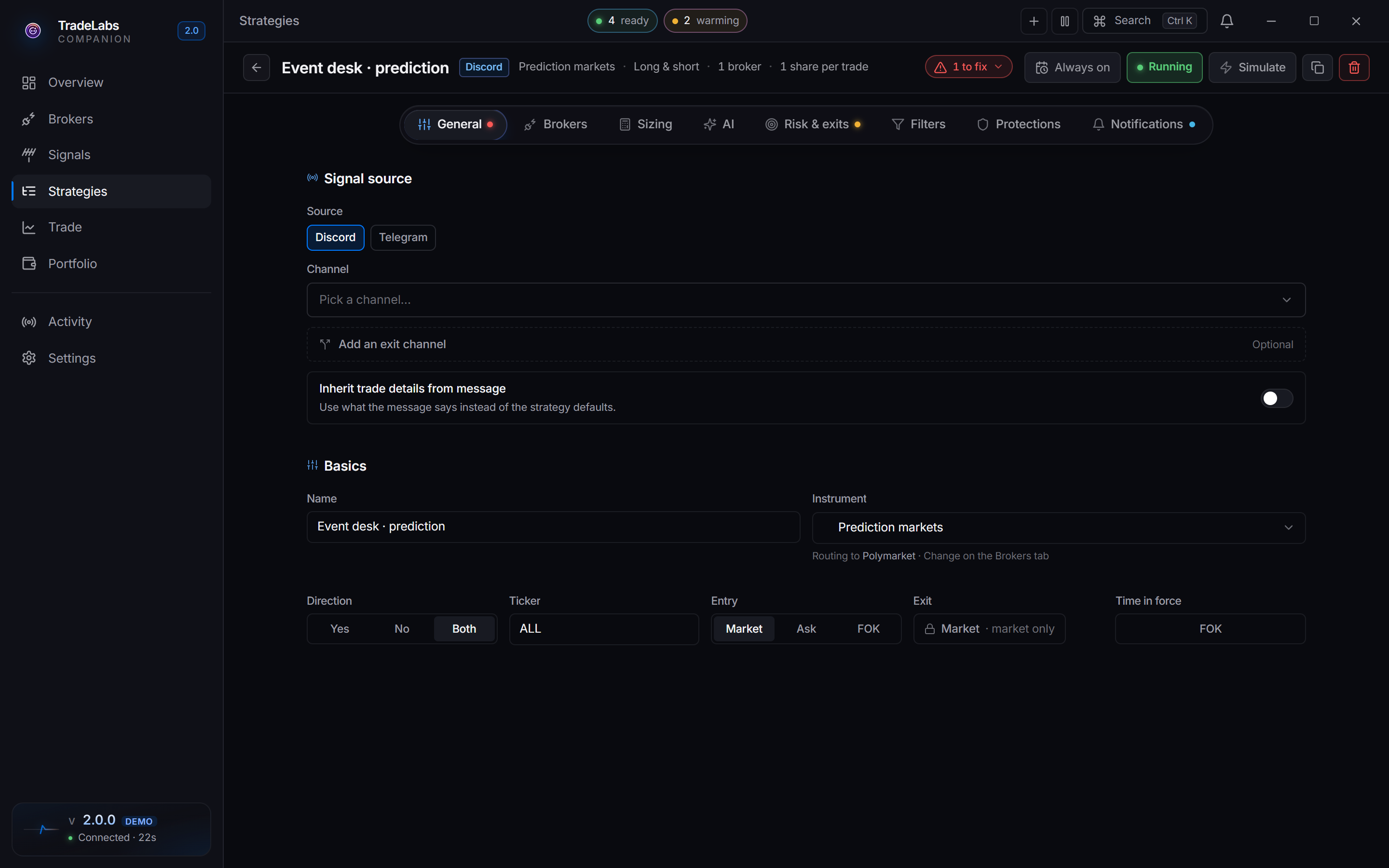
 A prediction-markets strategy in the editor, routing to Polymarket.
The fields that are specific to this instrument:
- Direction is labeled Yes / No / Both. Yes takes only positions betting the event will happen, No takes only positions betting it will not, and Both follows signals in either direction.
- Entry offers Market, Ask, and FOK (fill or kill). There is no Limit order for prediction markets, and Exit is a locked Market tile for the same reason.
- Time in force is fixed to FOK. A Polymarket order fills in full or it is cancelled, so there are no partial fills to manage.
Everything else on the General, Sizing, Filters, AI, and Notifications tabs works the same as other instruments, and you size in shares, dollars, or percent.
Prediction markets run on Discord or Telegram signals. TradingView alerts cannot carry one, so that chip does not appear on this instrument.
FOK is a good fit for prediction markets because liquidity can be thin. Rather than a partial fill at a bad price, the order either takes the whole position or walks away.
Risk and exits
On the Risk & exits tab you can set a Stop loss and a Take profit, both as a percentage move on the position. There is no trailing stop for prediction markets, so use stop loss and take profit to manage risk.
| Exit tool | Available |
|---|---|
| Stop loss | Yes |
| Take profit | Yes |
| Trailing stop | No |
Prediction market prices can swing sharply near an event’s resolution date. A stop that is too tight can close you out right before a favorable outcome, so size your exits with the event timeline in mind.
Next steps
Connect your wallet on the Polymarket broker page, then start from ready settings with the Prediction Markets template.