RSA+
RSA Setup & Go Live
Open and fund your RSA accounts, connect them in the app, build the locked RSA strategy, and go live across every account at once.
This is the hands-on half of RSA. If you have not yet read how the play works and picked your brokers, start with RSA+ Trading first.
Step 1: Open your accounts
The same basics apply to every RSA broker:
- U.S. residency and citizenship
- A valid Social Security number
- A bank account
- $50 to $100 to start
Some brokers (Fennel, BBAE, DSPAC) are mobile-app-first, so have your phone ready.
Start small. Open a couple of accounts at one or two brokers, fund them lightly, and get all the way to a working trade before you open ten more. Prove the flow before you scale.
The approach that keeps you under broker radar:
- Spread across brokers, not deep on one. A handful of accounts at five brokers is safer than fifteen at one.
- Respect each broker’s creation cadence. The pace limits (Fennel’s 2 per week, SoFi’s 1 per day) exist to keep you under the radar. Stay under them.
- Fund and let deposits settle. BBAE and DSPAC take days to clear. Connecting an account with unsettled funds means the app shows it ready but trades fail.
- Keep some normal activity. Accounts that only ever trade reverse-split plays are the ones that get flagged.
Full per-broker limits, cadences, and signup steps are on RSA Broker Limits & Signup. Each of the twelve RSA brokers also has its own reference page: Fennel, BBAE, DSPAC, Public, SoFi, Fidelity, WellsTrade, Robinhood, Chase, Firstrade, Webull, Schwab.
Wait until at least a few accounts are open, funded, and settled before connecting them.
Step 2: Connect them in the app
Open the Brokers page. Each supported broker has a card; click it to open its sheet, then Add account, enter your credentials, and Save account. The app verifies the connection itself. Fields differ per broker (email or username, password, an authenticator key), so follow that broker’s reference page for specifics.
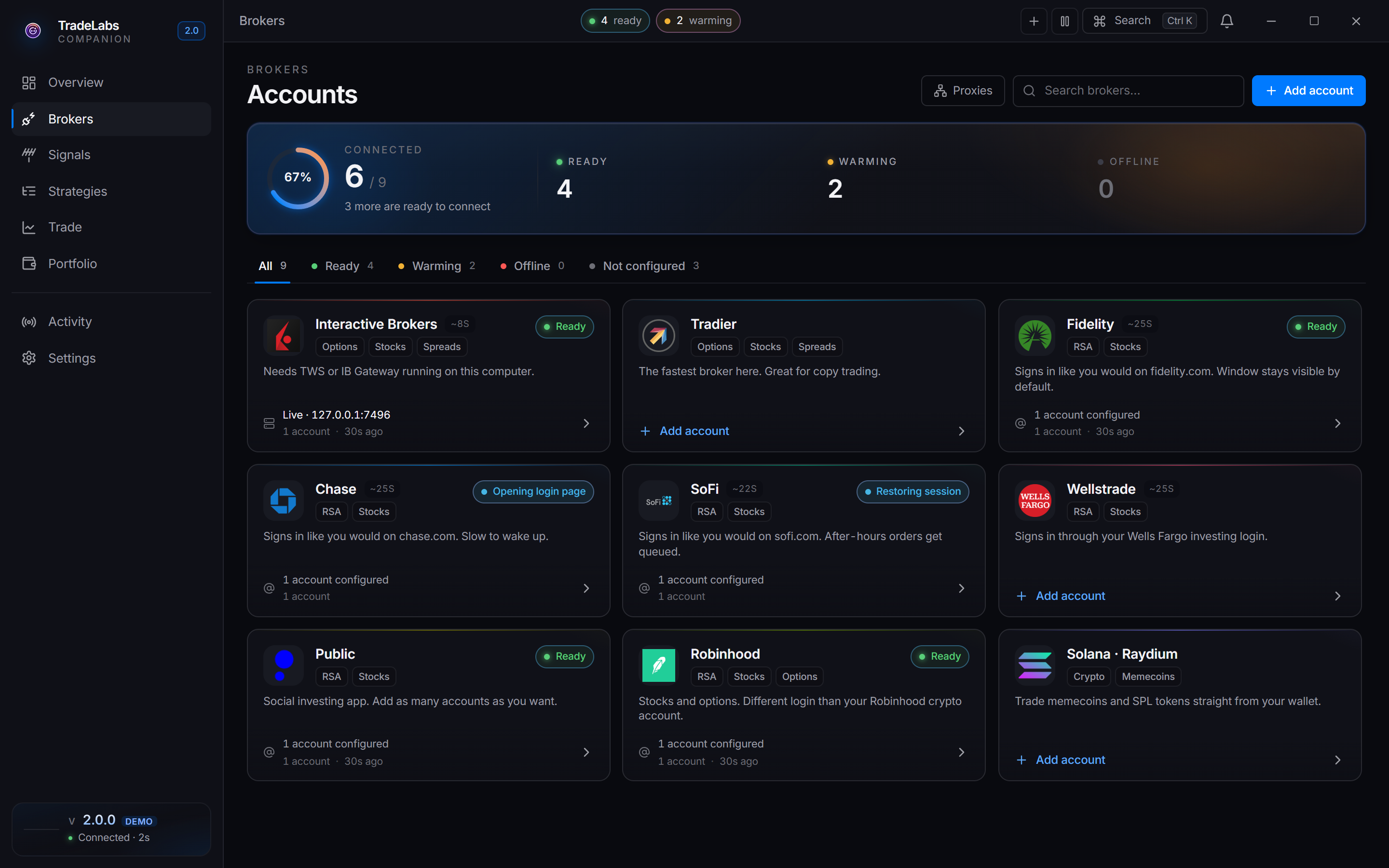
 The Brokers page. Each broker card opens a sheet and shows its accounts and health state.
Once your first account for a broker is connected, use Add another in that broker’s sheet to stack more. Each additional account is a full, independent login with its own credentials.
Add accounts gradually and stay under each broker’s creation cadence. Connecting them slowly also keeps the app responsive.
Browser-based brokers
Four brokers sign in through a real browser session the app drives in the background: Chase, Fidelity, SoFi, and WellsTrade. Two things follow:
- Sign-in can run visible or hidden. The broker sheet has a browser toggle (Browser: Visible / Hidden) so you can watch the sign-in window and complete any 2FA or unexpected prompt. Chase and WellsTrade default to hidden and are shown for first-time setup. Fidelity defaults to visible. SoFi is locked to visible and cannot be hidden. If a sign-in stays stuck, open the account’s ⋯ menu and use Sign in by hand to drive it yourself, or Clear browser data to start the next sign-in fresh.
- Warming is normal while they boot. A browser-based broker takes a moment to start, and the app shows it as Warming meanwhile. That is expected, not an error.
Verification differs per broker: Chase uses SMS, Fidelity and SoFi use the authenticator setup key you saved at signup, WellsTrade may prompt for an SMS code, and BBAE and DSPAC may show a captcha during connection. Whatever the method, the app shows an Enter verification code prompt (or the captcha image) inline in the sheet.
Reading broker health. Each broker shows one of four states: Active, Idle, Warming, or Offline. Idle is normal, not a problem. Only Offline needs attention. The full state table and what to do for each is on The App, Day to Day.
Aim to have several accounts connected and sitting at Active or Idle. You do not need every broker before you build a strategy, but the more you connect, the more the same signal can round up.
Step 3: Build the RSA strategy
With accounts connected, you build one strategy that turns an RSA signal into simultaneous orders across every broker you own. The fastest start is on the Strategies page: click Templates and pick Reverse split arbitrage, which pre-selects an RSA broker fan-out for you. Then adjust the brokers to match what you have connected.
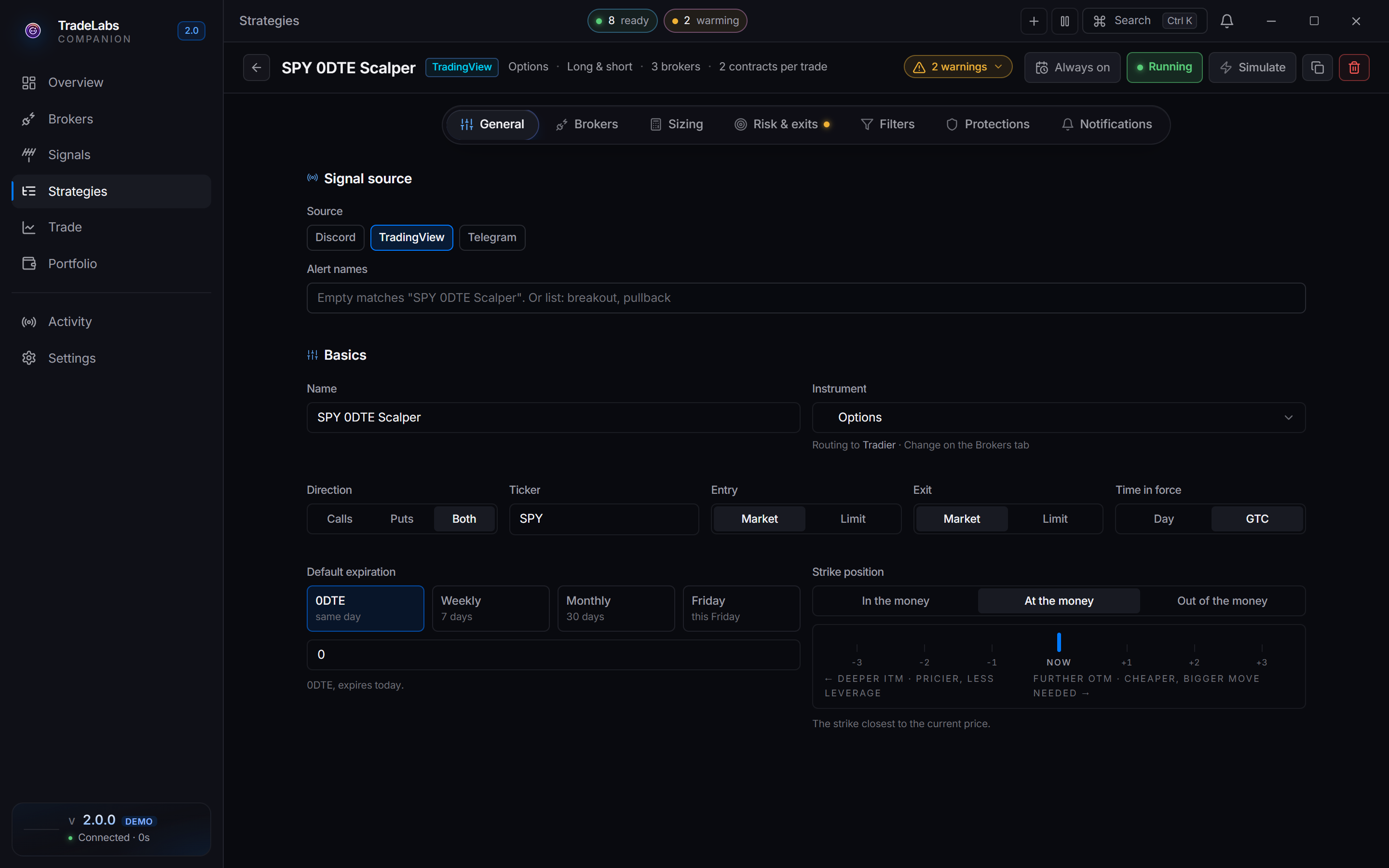
 The strategy editor, where you pick your signal source, brokers, and sizing.
Pick your signal source
In the strategy’s Signal source section, the Source field offers two chips for RSA, and you can run one strategy on each.
TradeLabs’ own servers scan the market for reverse-split opportunities and generate buy and sell signals automatically. Pick Serverside as the source; there is no per-source config to fill in, delivery is automatic.
- On the Protections tab, turn on Process sell signals so explicit close / sell messages are honored.
- Also on the Protections tab, set Minimum profit to skip a buy whose expected profit per share is below a dollar amount, for example $1. Sells are never skipped.
This is the simplest RSA setup and the one most RSA+ users start with.
If you follow a specific RSA caller, pick Discord as the source and point the strategy at that channel. When a play is posted, the app parses the ticker, direction, and timing from the message and fires to your brokers.
- Use the Channel field to search your channels or paste a channel ID.
- Turn on Inherit trade details from message so the app uses what the message says instead of the strategy defaults.
- Use this when you trust a particular provider’s calls or want a human in the loop alongside the scanner.
A second Discord account is recommended, but not required. Monitoring signs in as a self-bot so it can read the channels you already have access to. It is built to behave like an ordinary Discord client, and across more than two years of running it we have not had a single account banned. Plenty of people connect their main account and are fine.
If you would rather keep automation separate from the account you actually chat on, use a spare one. That is the only reason to bother.
The RSA settings are locked on purpose
RSA is a speed play built on a corporate event, not on price levels, so the strategy locks these for you:
| Setting | Locked to | Why |
|---|---|---|
| Direction | Both | RSA buys in and sells out, so the strategy handles both sides. |
| Position size | Fixed, 1 share | One small unit per account catches the round-up. |
| Entry method | Market | You want the fill, not a specific price. Profit comes from the split. |
| Time in force | Day | Fixed for RSA; you do not set it. |
| Stop loss | Not available | The thesis is the split event, not a price move. |
| Take profit | Not available | There is no price target to take profit at. |
| Trailing stop | Not available | Not applicable to RSA. |
Select all your brokers
The core of an RSA strategy: one signal, every connected account at once.
This is the core of an RSA strategy: one signal fires to every selected broker at once. In the strategy’s Brokers section you get a grid of every eligible broker you have connected; click a broker to check it. The section describes it plainly: fan out trades to every broker checked.
Maximum coverage: the Reverse split arbitrage template pre-checks Fennel, Firstrade, Public, BBAE, DSPAC, Robinhood, Chase, Fidelity, SoFi, and WellsTrade, so every connected account receives each order at once. Uncheck the ones you have not connected yet, then check more as you add them.
RSA plays have limited share availability at each broker. Fanning out maximizes your chance of getting filled somewhere, increases your total position, and means one broker rejecting the order does not sink the trade.
Fixed versus Follow sizing
RSA sizing has two modes, shown as segmented options:
| Mode | Label in the app | Behavior |
|---|---|---|
| Fixed | Fixed · 1 share | Buys one share per broker per signal. Predictable. |
| Follow | Follow signal | Takes whatever quantity the serverside feed pings (common for fractional-friendly brokers). |
For most RSA setups Fixed · 1 share is all you need. Use Follow signal only if you want to mirror the quantity a signal source suggests.
Edits save as you type, so once you have a source chosen, your connected brokers checked and sizing set, the strategy is stored. Leave it Paused for now — a Serverside strategy fires the instant you enable it if a play already qualifies, and Step 4 is where you make sure you are ready for that.
Step 4: Go live
Flip the strategy from Paused to Running in the app (or from dashboard.tradelabs.org as a remote control, which works while the app is connected). A Discord strategy then waits for the next call in its channel; a Serverside strategy starts receiving scanner signals right away.
The app must stay running to trade. All broker logins and execution live in the desktop Companion App. If you close the app, sleep the computer, or lose power, no RSA trades happen, no matter what the website shows. Keep the app open and the machine awake whenever you want to be trading.
Serverside fires immediately if there is an opportunity. When you set a Serverside RSA strategy to Running, orders may go out the instant you turn it on if a qualifying play already exists. Be ready for that.
Start tiny. Go live with a few accounts and small money first. Confirm signals arrive, orders fire, and fills land the way you expect before you trust the setup with more accounts or capital.
RSA fires the same signal to every selected broker at once, so watch them together on the Portfolio page.
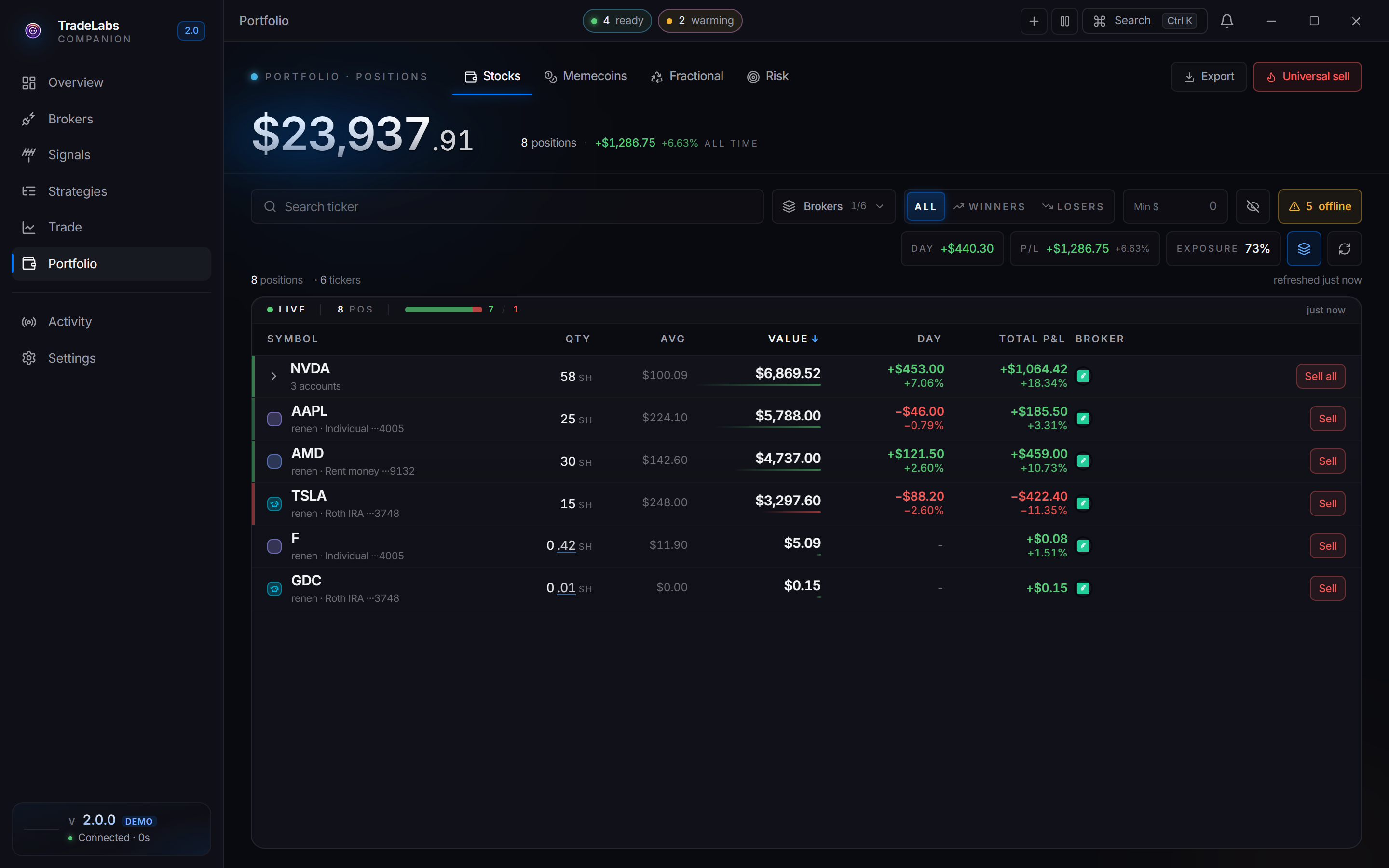
 The Portfolio page shows positions filling across your connected accounts.
- Per-broker outcomes. Each broker reports its own result. A fast broker goes green quickly, a browser-based one like Chase can take longer, and one broker rejecting an order does not stop the others.
- Not every broker fills every play. Share availability is limited and any broker can reject or come up empty on a given play. Partial coverage is normal.
- Exits. On Serverside with Process sell signals on, the strategy acts on close / sell signals as they arrive. Otherwise you manage exits yourself.
Step 5: Scale
Scaling RSA means one thing: more accounts. More accounts means the same signal rounds up in more places. But it is a marathon:
- Open more accounts over time, respecting cadences. Fennel’s 2 per week, SoFi’s 1 per day, and so on. Blowing past these is the fastest way to get flagged.
- Connect each new account in the app as you open it, and check it in your strategy’s Brokers grid so it joins the fan-out.
- Keep some normal activity in each account. Accounts that only ever trade reverse-split plays are the ones brokers close.
- Spread across brokers, not just deep on one. Coverage across many brokers beats stacking one.
Proxies (RSA+)
Once you are running many accounts, especially many at the same browser-based broker, you may want each account to connect through its own network path. That is what proxies are for.
TradeLabs keeps a strict rule that a broker never reuses a proxy across its own accounts, which is the whole point for ban safety. Most people do not need them until they are running a lot of accounts. See Proxies when you get there.
Where to go next
- RSA Broker Limits & Signup: the full per-broker detail for scaling
- Serverside and RSA Strategies: full reference for both the RSA scanner and Discord-driven RSA
- The App, Day to Day: the four broker health states in depth