What You Can Trade
Options
Trade single-leg call and put options from a signal: how a strategy buys to open, which brokers support it, and the expiration, strike, and exit controls.
Options are single-leg calls and puts. A call profits when the underlying rises, a put profits when it falls. TradeLabs trades the price movement in the option premium, not delivery of the underlying. A strategy always buys to open and later sells to close, and it never exercises a contract. Options trade in contracts, not shares.
An options strategy only ever buys to open. It does not sell to open a naked option, so the direction picks the option side rather than a buy or sell. That is why the direction labels read Calls, Puts, and Both. To sell to open with the risk capped, use a sell-to-open spread.
Turn on Inherit trade details from message. It’s in the Signal source section of the General tab, and for most people it is the single most important setting on an options strategy. It is the difference between “buy some SPY calls” and “buy the exact contract that was called”.
With it on, the strategy stops using its own defaults and takes the contract straight from the call:
- the ticker the call names (Ticker is pinned to
ALL), - the strike the call names — the strike-position offset is pinned to
0, so it buys that strike rather than one near the money, - the expiration the call used, rather than a fixed number of days out.
You end up holding the same contract as the person you follow. That is usually the whole point of copying them.
It applies to Discord and Telegram strategies, where calls arrive as text for the AI to read. TradingView alerts already arrive structured, so there is nothing to inherit.
The same call, with the setting on and off. Off, you get a different strike and a different expiry — a different trade.
Which brokers trade options
Set Instrument to Options and the broker picker narrows to these four.
| Broker | What it adds |
|---|---|
| Interactive Brokers | Market or limit entry, extended hours |
| Tradier | Market or limit entry, smart expiration |
| Charles Schwab | Market or limit entry, extended hours, smart expiration |
| Robinhood | Limit entry only |
All but Schwab also trade multi-leg spreads.
Robinhood has no market order for options. Its API only exposes the limit calls, so the editor hides Market and prices the limit at the ask, the marketable limit a market order stands in for.
Set up an options strategy
Open a strategy from the Strategies page and set the Instrument to Options on the General tab. That unlocks the options fields and restricts the broker choice to the four brokers above. If exactly one options broker is connected, the editor assigns it for you.
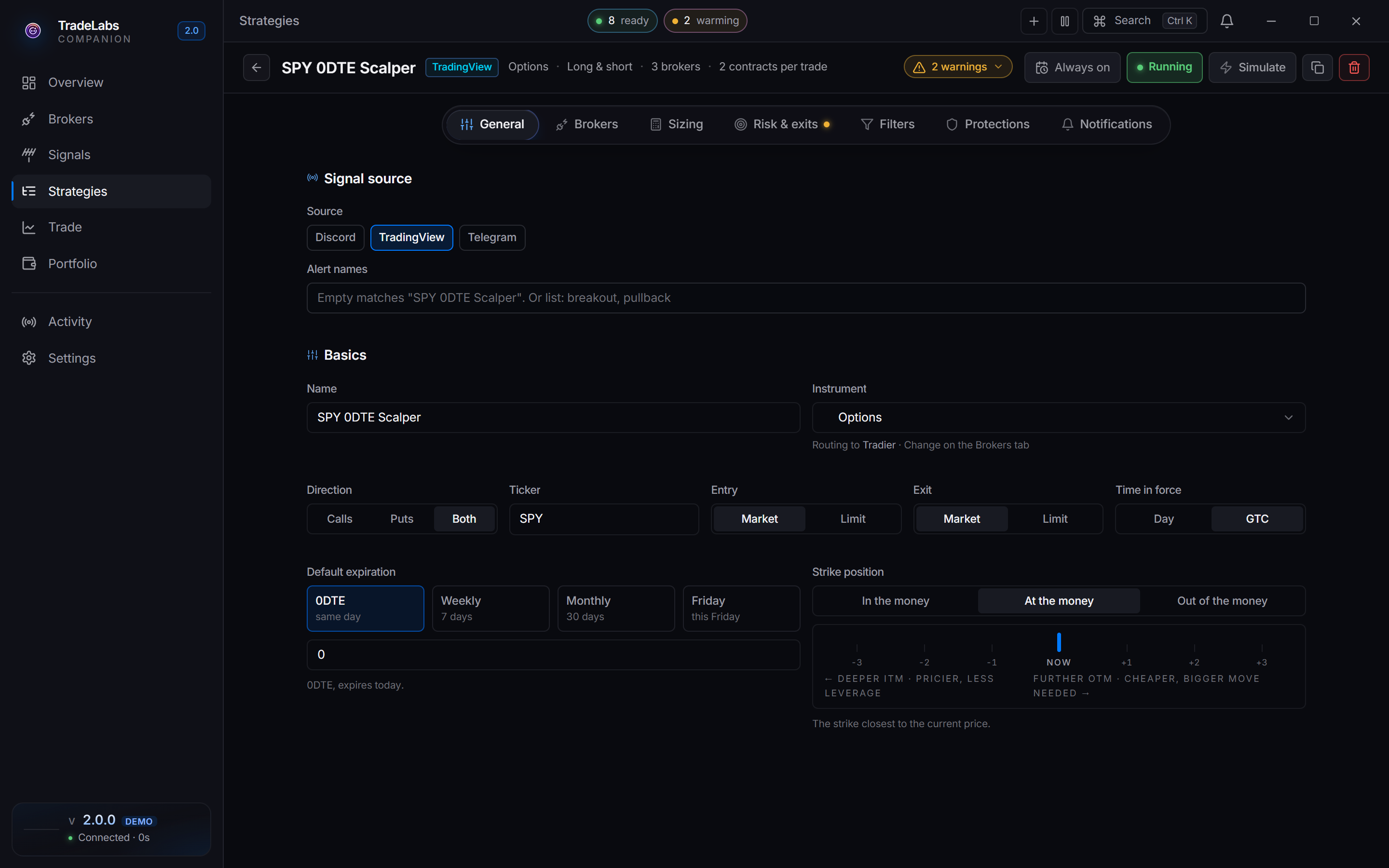
 The Options strategy editor, showing the expiration and strike-position fields
Direction
For options the Direction field reads Calls, Puts, or Both. It picks which side the strategy acts on, not a buy or sell.
| Option | What it means |
|---|---|
| Calls | Open long calls, act on call signals only |
| Puts | Open long puts, act on put signals only |
| Both | Act on whichever side the signal names |
Expiration and strike
Two fields decide which contract gets bought. They live on the General tab under the Options group.
With Inherit trade details from message on, skip both. The app pins them and reads the strike and expiration off each call. Set them by hand only when the room posts “SPY calls, going in now” with no strike or date, or when you want every trade on your own expiry regardless.
- Expiration picks how far out the contract is. Enter
0for same-day, a number of days like7, or a weekday name likeFridayfor the next contract on that day. When the source parses free-text signals (Discord and Telegram) you can also set it to read the expiration from the signal text. - Strike position sets where the strike sits relative to the current price, as a segmented control: In the money, At the money, or Out of the money, plus a strike offset. At the money is nearest the price, out of the money is cheaper but needs a bigger move, and in the money is pricier with less time decay.
The strike offset counts listed strikes, not dollars. With the stock at $450 on a chain listed every $1:
| Strike position | Call bought | Put bought |
|---|---|---|
| At the money | 450 | 450 |
| Out of the money, 1 | 451 | 449 |
| Out of the money, 3 | 453 | 447 |
| In the money, 1 | 449 | 451 |
On a chain listed every $5, “out of the money, 1” is $5 away instead. Out of the money always means away from the price in the direction that makes the option cheaper: higher strikes for calls, lower strikes for puts.
Weekday expirations. When Expiration is a weekday name like Friday, the Buy same-day on the matching weekday protection decides what happens on that weekday itself:
- Off: “Friday” always means next Friday’s contract, even when today is Friday.
- On: on a Friday, “Friday” buys today’s same-day (0DTE) contract instead of waiting a week.
Expiration dates in messages. When the expiration is read from the signal, the AI understands the common ways callers write dates, such as 1/19, Jan 19, 01/19/24 and 0DTE. When a signal names no expiration at all, Smart expiration detection (if on) buys the closest one available.
At the money is nearest the current price, out of the money needs a bigger move, in the money has less time decay
Entry and exit
Entry method and Exit method sit on the General tab. Market fills now at the current price. Limit fills only at your price or better.
Pick Limit and a price side appears:
| Price side | Where the limit sits |
|---|---|
| Bid, Mid or Ask | On the live quote at that side. Ask fills fastest on a buy, bid on a sell. |
| From alert | On the per-contract price the caller wrote. Options only, and only on Discord or Telegram. IBKR takes it on entries, not exits. |
Tradier, IBKR and Schwab already use the caller’s price on a Discord or Telegram alert, so Bid / Mid / Ask only takes over when Smart price override is on. Robinhood is the opposite: the side always wins. The editor warns you inline when your pick won’t apply.
Limit offsets nudge a limit price so it fills more easily:
- Buy offset: places the buy limit above the price.
$0.05pays up to a nickel more per contract,1%scales with the price. Higher means more likely to fill. - Sell offset: places the sell limit below the price.
$0.05gives up a nickel to get out. A negative sell offset like-$0.05does the opposite and holds out for a better price, at the risk of not filling.
Size the trade on the Sizing tab: a number of contracts, a dollar amount, or a percent of Available Funds or Net Liquidation.
Example: a room that names no contract
Some rooms post calls like “Entering SPY calls now!” with no strike or expiry. Inheriting from the message has nothing to copy, so turn Inherit trade details from message off and let the strategy fill in the contract:
| Setting | Value | Why |
|---|---|---|
| Inherit trade details from message | Off | The message has no contract to copy |
| Ticker | SPY | The only ticker this room trades |
| Direction | Both | Calls when they say calls, puts when they say puts |
| Expiration | 0 | Same-day contracts |
| Strike position | At the money | The strike nearest the price at the moment of the call |
When the call comes in, the strategy buys the at-the-money SPY call or put expiring today. Pair it with Auto-close 0DTE on the Protections tab so nothing is left open into the close.
Risk and exits
Options carry real volatility, so the exit tools matter. All three exit controls are available for options and live on the Risk and exits tab. Each accepts a dollar amount or a percent.
| Control | What it does |
|---|---|
| Stop loss | Close the position if it drops this far |
| Take profit | Close the position if it gains this much |
| Trailing stop | Follow the price up and close when it pulls back this far |
Once a take-profit value is set, a Take-profit behavior panel lets you close all at once or sell in stages. Once a trailing stop is set, a Trailing-stop behavior panel picks between five modes. See Trailing stops for the full detail.
Options also carry two guardrails of their own on the Protections tab: Buy same-day on the matching weekday, which turns an expiration like “Friday” into a 0DTE buy when today is Friday, and Auto-close 0DTE, which flattens same-day positions a set number of minutes before the close.
Next steps
- Connect a broker: Interactive Brokers, Tradier, Charles Schwab, or Robinhood.
- Start from ready settings with the Options template.
- Trading both legs at once? See spreads.