Get Started
Welcome & How It Works
What TradeLabs is, and how the desktop app and web dashboard work together.
You follow people who call out trades: a Discord options room, a Telegram group, your own TradingView alerts. The problem is speed. By the time you see the message and place the order, the move is half over. TradeLabs closes that gap by placing the call for you the instant it goes out.
It trades stocks, options, spreads, futures, crypto, memecoins, prediction markets, and RSA, depending on your plan and brokers. It is not a signal provider: it executes the calls you choose to follow, it does not tell you what to trade.
What that looks like
A trader in a Discord room posts:
BTO SPY 540c 0dte @ 1.20
If you’ve set up a strategy that follows that room, the next second or two happen with no action from you:
- The app sees the message.
- Its AI reads it: buy to open, SPY, 540 call, expiring today, around $1.20.
- It places that order in every broker the strategy targets.
- If you set a stop or take-profit, it manages the exit too.
You were never at your keyboard. That’s the point.
The same thing happens if that call arrives in a Telegram group instead. And if you trade your own TradingView setups, the alert your indicator fires does the same job as the message — it just arrives already structured, so there’s nothing to read.
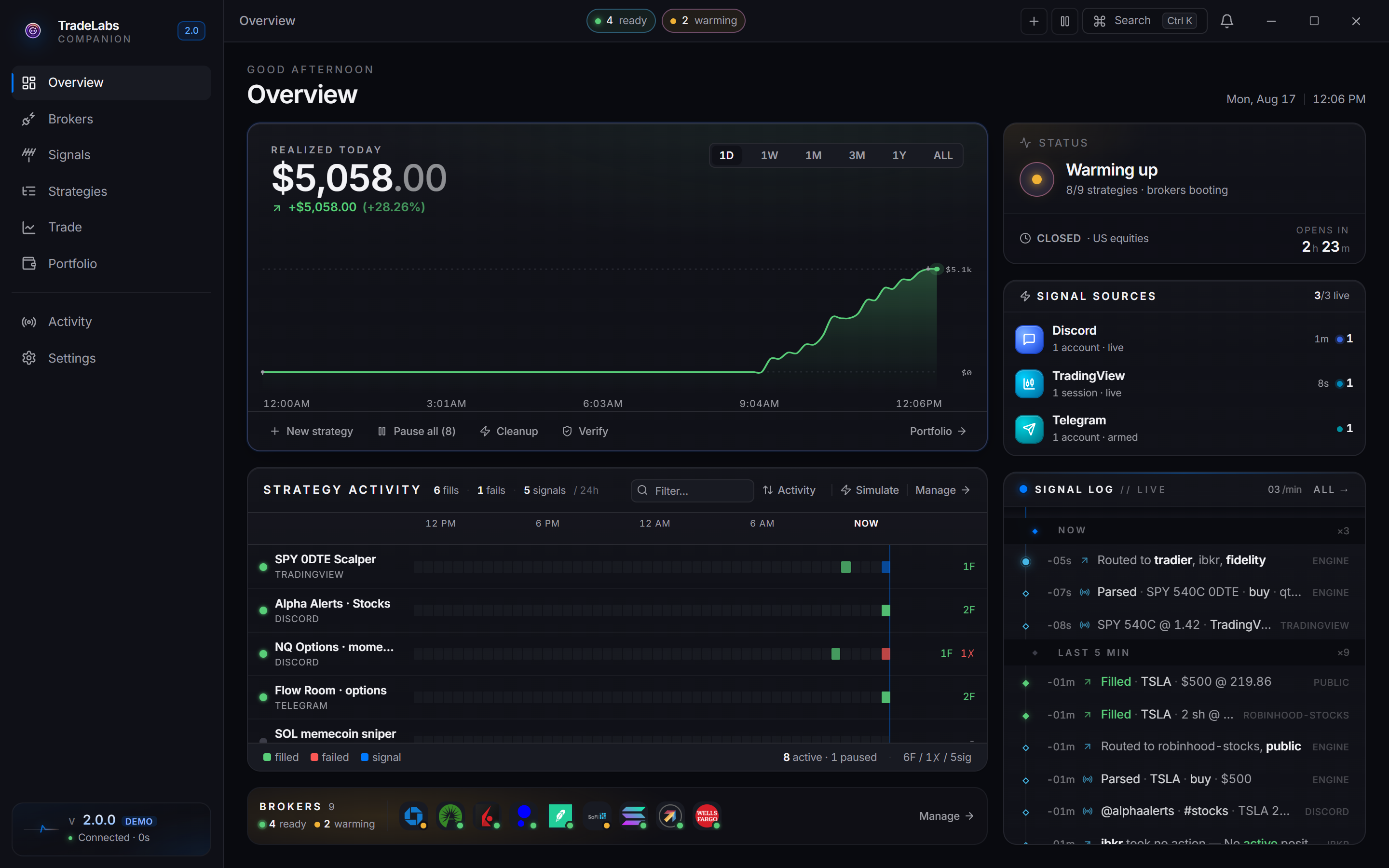
 The Overview page: what you watch instead of the chat. Live profit, every running strategy, broker health, and each signal and fill as it lands.
The two parts
TradeLabs is a desktop app plus a website, and they do different jobs:
- The app is the engine. It runs on your Windows computer and does the real work: holds your broker logins (encrypted, on your machine, never uploaded), watches your signals, reads each call, and places the trades.
- The website is the remote control. At dashboard.tradelabs.org, from any browser, you create, start, and stop strategies and watch your profit and loss while away from your computer.
They stay in sync automatically. Change a strategy in one place and the other picks it up within seconds.
The app does the trading
Trades only happen while the app is open. The dashboard is a remote control, but the app on your computer is what places orders. Close the app, or let the computer sleep, and nothing trades. Keep it running on a machine that stays on.
What you need
Everyone needs these four:
- A TradeLabs subscription and license key (emailed when you subscribe; check spam).
- A Windows PC that can stay on (Windows 10 or 11).
- Google Chrome installed (some brokers and sources sign in through a Chrome window).
- At least one brokerage account, and a signal source to follow.
Then, whichever source you follow
TradeLabs reads calls from three places, and they need different things from you. You only need the row for the source you actually use — and you can run all three side by side, one strategy each.
| Your source | What you need for it | AI key? |
|---|---|---|
| Discord — you follow a room that posts calls in chat | A Discord email and password to sign in with. A spare account is recommended, not required | Yes |
| Telegram — you follow a group or channel | Your phone number, plus an api_id and api_hash from my.telegram.org (free, two minutes) | Yes |
| TradingView — your own indicators and alerts fire the trades | Your TradingView email and password. You sign in once and the app reads the alerts on your account — no webhooks to wire by hand | No |
Why two of them need an AI key. Discord and Telegram calls are people typing in English (“in SPY 540c @ 1.20”), so the app uses an AI model to read them, and that model is billed to your own OpenAI or Gemini key. TradingView alerts arrive as structured data the app already understands, so a TradingView-only setup needs no AI key at all. Reading a call costs a fraction of a cent — see Create an AI key.
For RSA you need the RSA+ plan and several broker accounts instead — no signal source is involved.
Ready? Install the app and sign in, then choose your path.