Risk & Exit Tools
Protections
The guardrails that run before every trade in a strategy: skip duplicate signals, cap slippage, cancel stale orders, and limit position size.
Protections are the guardrails a strategy runs before every trade. In the Companion App they live inside the strategy editor, on the Protections tab. The section header reads “Guardrails that run before every trade” and shows how many are armed — for example “0 of 12 armed”. The total depends on the strategy’s instrument and broker, so the second number varies.
The Cloud Dashboard groups four of these differently. Its Strategy Builder has no single Protections panel, so if you are editing from the web and cannot find a switch, look here:
| Setting | Companion App | Cloud Dashboard |
|---|---|---|
| Smart expiration detection | Protections | Instrument details → Behavior |
| Weekday 0DTE | Protections → Order safety | Instrument details → Behavior |
| Smart price override | Protections | Execution |
| Selling restriction bypass | Protections → Signal rules | Execution |
Everything else on this page is on the Protections tab in the app and in the equivalent builder section on the web. Both write the same strategy, so a switch set in one shows up in the other.
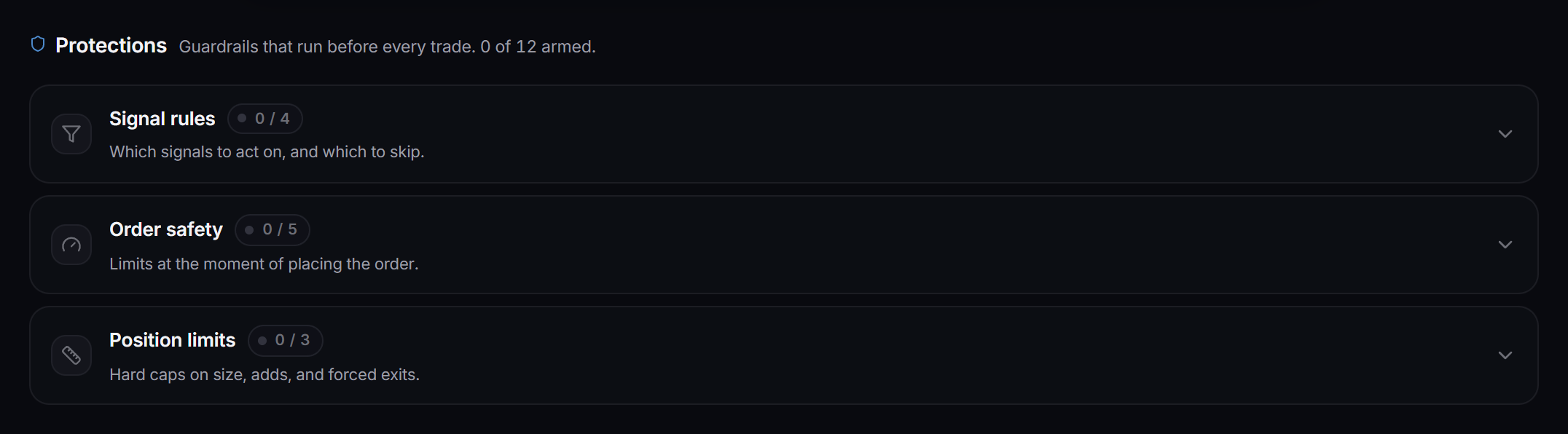
 The Protections tab. Each group card shows its armed count (like 0 / 4); expand a card to reach the individual guardrails.
Each guardrail is a single row with an on/off toggle. Turn one on and its number field appears next to it. Turn it off and the field greys out but stays visible, so you can see the value you had set.
The rows are grouped into three cards:
| Group | What it covers |
|---|---|
| Signal rules | Which signals to act on, and which to skip. |
| Order safety | Limits at the moment of placing the order. |
| Position limits | Hard caps on size, adds, and forced exits. |
Which rows show up depends on the strategy’s instrument and broker. A stock strategy on one broker will not show every row a multi-leg options strategy on another broker does. Only guardrails the broker actually enforces are shown.
Signal rules
- Duplicate protection drops a signal that matches a recent trade on this strategy, so the same alert firing twice does not double your position.
- Avoid stacking the same ticker stops you re-entering a name you already hold unless the price has moved far enough from your average cost. Set the distance as a percent.
- Process sell signals honours explicit close, STC, and sell-to-close messages.
- Smart expiration detection picks the next valid expiration when an options signal is vague about the date.
- Smart price override uses live quotes when they are more recent than the price in the signal.
- Selling restriction bypass lets the strategy close positions it did not open itself. Normally a strategy only exits trades it opened. The toggle appears on Stocks and RSA strategies, and it only takes effect on IBKR, Tradier and STG (DAS).
- Auto position cleanup closes the least healthy holdings once you hold more than a set number at once. Memecoins only.
Order safety
- Slippage cap rejects a fill more than the set percent away from the expected price. Enter the cap as a percent, for example 2.5. On Interactive Brokers it also covers spreads, credit spreads included.
- Cancellation timer cancels an open order that has not filled after the set number of minutes.
- Entry delay waits the set number of seconds after a signal before placing the order.
- Buy limit offset and Sell limit offset nudge limit orders off the price. Each takes a dollar amount or a percent of the price. These only appear when the matching entry or exit method is set to a limit order.
- Wait for the break is for alerts like “NUR @ $4.15 BREAK”, where the trader means buy only once the price reaches 4.15. With it on, the order waits at the broker and buys only when the price breaks that level, never paying more than the percent you set above it (empty means 2%). Alerts without a break level buy as usual. It appears on Interactive Brokers stocks, options and futures strategies, and on Robinhood and Tradier stocks and options strategies. On those two it works in the regular session only; outside it the alert buys as usual. If the price is already past the break when the alert arrives, Robinhood places a plain limit at your cap. For an option alert like “TSLA 425C ON THE BREAK OF $407.30”, the break is read from the stock price, which only Interactive Brokers supports; Robinhood and Tradier buy those as usual.
- Keep chasing until filled is for limit buys that the market runs away from. If the order has not filled, it is moved to the current ask and sent again every 10 seconds, up to 5 times, never paying more than the percent you set above your first limit (empty means 2%). After the last try the order stays open and your Cancellation timer still applies. Exits are never chased. With Wait for the break on, it never pays above the break cap. It appears on Interactive Brokers, Tradier and Robinhood stocks and options strategies whose entry is a limit order. Interactive Brokers and Tradier move the same order; Robinhood cancels it and places a new one for whatever has not filled.
- Buy same-day on the matching weekday buys today (0DTE) when the expiration names a weekday and today is that day. Auto-close 0DTE has the broker flatten those positions a set number of minutes before the close. Both appear only for options and spreads strategies.
If the price jumps past the cap, the order does not chase it. It stays open without filling, and your Cancellation timer (if on) starts counting once the break is reached, not when the alert arrived. Your stop loss, take profit, trailing stop and move to breakeven attach as usual and are set from the price you actually paid.
If you turn Slippage cap on, set a number. An armed slippage cap with a blank value is a broken state that can cause the broker to reject every trade. Clearing the number turns the guardrail off, which is intentional.
Position limits
- Maximum trade value is a hard dollar cap per trade. The trade aborts if size times price exceeds it.
- Double-down protection controls repeated buys on a name this strategy already holds. See below.
- Block-exit threshold (STG / DAS only) refuses a sell while the position’s P&L from your average cost is past the set percent, so it can recover or hit your stop instead. Enter a loss as a negative number: -50 will not sell at a 50%+ loss. A positive number blocks sells at that gain or more.
- Move stop after a trim (Interactive Brokers stocks, options and futures; Robinhood and Tradier stocks and options). When the first trim or partial take profit fills, the stop on what is left moves to your entry price, so the rest of the trade cannot turn into a loss. Enter a percent to lock in profit instead: 5 moves the stop to 5% past your entry; empty or 0 means breakeven. It only ever tightens the stop, and if the price is already past the new stop it waits until the price comes back. The strategy needs a stop loss.
- Per take-profit level follow-ups (Interactive Brokers stocks, options and futures). When the take profit sells in stages, each level can also say what happens next: Then stop at moves the stop on what is left to that % past your entry once the level fills (0 = breakeven), and Start trailing turns on your trailing stop from there. Example: +25% sell 50% then stop at 0; +50% sell 25% then stop at 20; let the rest run. The stop only ever tightens.
- Minimum profit (Serverside / RSA only) skips a buy when its expected profit per share, the expected post-split sell price minus the buy price, is below the dollar amount you set. Sells are never skipped.
Double-down protection
Turn Double-down protection on and, on brokers that support a cap, a panel opens below the row with two choices:
- Block every add never adds to a position you already hold.
- Add up to a limit keeps adding until a cap, then blocks.
When you pick Add up to a limit, you get the cap field, and — where the broker enforces more than one unit — a Measure the limit by control above it:
| Broker | Measures offered |
|---|---|
| Interactive Brokers, Tradier | Dollar value, Quantity, Number of adds |
| STG / DAS | Dollar value only, so the measure control is hidden and you go straight to the cap |
| Every other broker | No cap at all — see the note below |
On brokers that do not support a cap, Double-down protection is a plain on/off toggle that blocks every add. On brokers that do, switching the measure clears the current cap, since a dollar value read as a share count would be nonsense — and a blank cap fails safe back to blocking every add.
Tips
- The group cards collapse when nothing is armed and open when something is. A vanilla strategy shows three tidy header rows.
- Each row has a help icon. Hover it for a short explanation of what the guardrail does.
- Numbers are shown in friendly units even when they are stored differently. Entry delay is shown in seconds, the cancellation timer in minutes, and the slippage cap as a percent.