Reference
Plans and Pricing
The two TradeLabs subscription plans, what each one unlocks, and how to switch between them from the Cloud Dashboard.
TradeLabs has two subscription plans: Copy Trading and RSA+. Both unlock the full trading engine and every signal source. The difference is Reverse Split Arbitrage (RSA), broker coverage, and how many strategies you can run at once.
Copy Trading
$49.99 per month. This is the standard plan. It runs the full engine across the copy trading brokers and covers stocks, options, spreads, futures, crypto, memecoins, and prediction markets.
- Up to 20 strategies
- Copy trading brokers
- Curated signal providers
- Auto-execution
- Premium order routing
Copy Trading is the right plan for most members. It covers everything except Reverse Split Arbitrage.
RSA+
$149.99 per month. RSA+ includes everything in Copy Trading, plus Reverse Split Arbitrage and a higher strategy limit. It is marked as the recommended plan in the dashboard.
- Up to 60 strategies
- Every supported broker, plus RSA routing
- Multi-account fan-out (one RSA signal routes to every eligible account)
- Upcoming Splits calendar in the Cloud Dashboard
- Proxy management
- Beta feature access
- Custom integrations
Billing periods and the trial
Both plans bill monthly by default, and both are cheaper paid yearly.
| Plan | Monthly | Yearly |
|---|---|---|
| Copy Trading | $49.99 / month | $479.99 / year, $40.00 a month |
| RSA+ | $149.99 / month | $1,440 / year, $120.00 a month |
A 7-day trial of Copy Trading is offered alongside them. It costs nothing up front and rolls to $49.99 a month after day 7. The trial is capped at 1 strategy, not the paid plan’s 20. Everything else about the copy-trading surface is there. Cancel before day 7 and you pay nothing.
Plan comparison
| Feature | Copy Trading | RSA+ |
|---|---|---|
| Copy trading brokers | Yes | Yes |
| Every supported broker | No | Yes |
| Signal sources (Discord, Telegram, TradingView, Serverside) | Yes | Yes |
| Custom strategy creation | Yes | Yes |
| Stocks, options, spreads, crypto, memecoins | Yes | Yes |
| Futures (via Interactive Brokers) | Yes | Yes |
| Prediction markets | Yes | Yes |
| Manual order panel | Yes | Yes |
| Auto-execution | Yes | Yes |
| Maximum strategies | 20 | 60 |
| RSA routing (Reverse Split Arbitrage) | No | Yes |
| Multi-account RSA fan-out | No | Yes |
| Robinhood stock logins | 1 | No limit |
| Robinhood Chain wallets | 1 | Up to 5 |
| Accounts tab (accounts by person or account type) | No | Yes |
| Upcoming Splits calendar | No | Yes |
| Proxy management | No | Yes |
| Beta feature access | No | Yes |
Switching plans
You choose and change your plan from the Cloud Dashboard.
- Sign in at dashboard.tradelabs.org.
- Open License Upgrade from the navigation, or from your Profile use Go to License Upgrade.
- On the Plans and subscription page, press Switch to Copy Trading or Switch to RSA+ on the plan you want. This opens the Stripe customer portal in a new window, where you confirm the change and manage payment.
To cancel or change your payment method, use Manage billing on the same page. It opens the same Stripe portal.
Your license binds to your account automatically, so there is no key to paste. Once the change goes through, both the dashboard and the Companion App reflect your new plan.
Move to the RSA+ app
Copy Trading and RSA+ ship as two separate apps. The Copy Trading app does not have the RSA features, even on the RSA+ plan. One exception: on the RSA+ plan, the Copy Trading app runs more than one Robinhood login. After you upgrade, move to the RSA+ app.
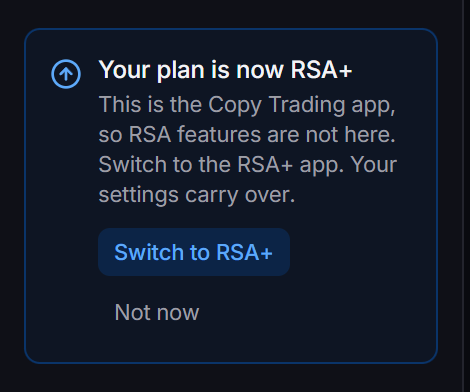
The app checks your plan again when you come back to its window. When it sees RSA+, the sidebar shows Your plan is now RSA+.
On Windows:
-
Click Switch to RSA+ in the sidebar. The card shows Downloading RSA+. The app restarts when it is ready.
-
Wait. The app downloads the RSA+ installer and checks it. Then the app closes and the installer runs.
-
TradeLabs RSA+ opens in place of the Copy Trading app. Your settings carry over.
If the switch fails, the card shows the reason in red and a Try again button. Nothing is installed until the download passes its check. Click Not now to hide the card until the next time you open the app.
On a Mac, click Switch to RSA+. The card then tells you to download TradeLabs RSA+ from the dashboard. Click Open dashboard, download the RSA+ .dmg, quit the Copy Trading app, and drag TradeLabs RSA+ into Applications in its place. Only one of the two apps can be installed at a time. A Mac app updates itself, but it cannot change itself into the other app, so you do this swap by hand. Your settings carry over. The first open needs the same Open Anyway step as any new version: see Install on a Mac.
The RSA+ app needs the RSA+ plan. If you run the RSA+ app on the Copy Trading plan, the app is blocked with a message that tells you to download the correct installer from the dashboard.
Next steps
- Platform overview to learn how the pieces work together.
- Install and sign in to create your account and get the app running.
- Cloud Dashboard to explore the remote control.
- RSA overview to learn about Reverse Split Arbitrage trading (RSA+ plan).