TradingView Strategies
Options Strategy
Build a TradingView strategy that buys calls and puts from your alerts: how Direction decides what each alert does, how the contract is picked, sizing, exits and broker differences.
An options strategy buys single calls and puts. The alert only says the ticker and buy or sell. Your strategy picks the contract, how many to buy, and when to get out.
Brokers: Interactive Brokers, Tradier and Robinhood. Schwab does not take TradingView options trades.
What each alert does
Direction decides it. These two setups behave the same on every broker that supports them:
- Calls is the simplest: bullish only. A buy alert opens, a sell alert closes.
- Both trades both ways on IBKR and Tradier, flipping from calls to puts and back.
Puts works differently by broker. On IBKR a sell alert buys the put and a buy alert closes it. On Tradier and Robinhood it is the other way round. If you want puts from a sell alert everywhere, use Both on IBKR or Tradier, or a Spreads strategy with Sell alert opens set to Put debit.
Build it
-
Create your alert in TradingView and prepare it in the app. How TradingView Trading Works shows how.
-
On Strategies, click New strategy, and set Source to TradingView.
-
Set Name to your alert’s name and Instrument to Options. Choose IBKR, Tradier or Robinhood on the Brokers tab.
-
Set Direction to Calls or Both.
-
Set Ticker to your chart’s symbol, or
ALL. -
Pick the contract with Default expiration and Strike position (below).
-
Set the size, a stop loss and a take profit.
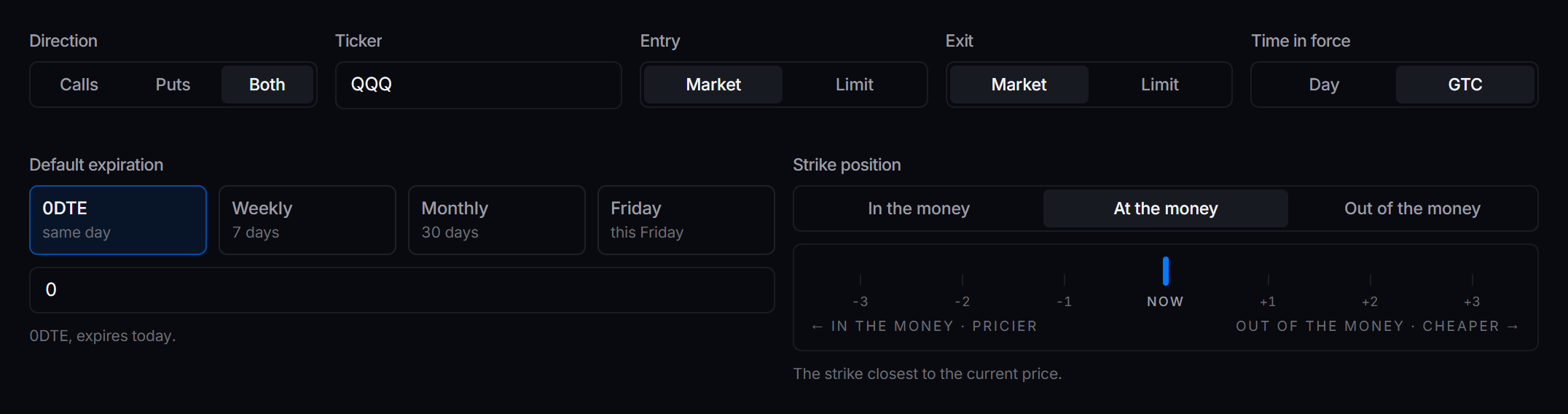
 Direction, order settings, expiration and strike position for a QQQ strategy on Tradier.
Picking the contract
The alert never names a strike or a date. They come from two settings, read when the alert fires.
| Setting | Choice | Result |
|---|---|---|
| Default expiration | 0DTE | Expires today |
| Weekly | About 7 days out | |
| Monthly | About 30 days out | |
| Friday | This Friday’s contract | |
| A number | That many days out | |
| Strike position | At the money | The strike nearest the price |
| Out of the money | Cheaper, needs a bigger move | |
| In the money | Costs more, less time decay |
How many contracts
Under Sizing, set How to pick the trade size to Fixed size and Default quantity in Contracts (2 buys two) or Dollars ($500 buys as many as $500 pays for). A sell alert closes what is held, whatever this is set to.
Order settings
| Setting | Choose | Why |
|---|---|---|
| Entry | Limit, priced at Ask | Fills fast without paying through a wide market. |
| Exit | Market, or Limit on Robinhood | A limit exit that does not fill leaves you in the trade. |
| Time in force | Day | An unfilled order is cancelled at the close. |
Robinhood has no market order for options. The editor only offers Limit there, priced to fill.
Getting out
Set Stop loss and Take profit under Risk management. They close the option on their own, with no alert needed. A sell alert (with Calls) or the opposite alert (with Both) closes it too, whichever comes first.
Repeat alerts
Two buy alerts in a row buy twice on Calls, unless Double-down protection under Protections is on. Turn it on to hold one position per ticker. On IBKR with Both, a repeat buy closes the call and buys a fresh one.
Test it
-
Set Default quantity to
1contract, or use a paper account. -
Fire the buy alert. Activity shows the alert, the contract picked, the order and the fill.
-
Fire the sell alert. With Calls, the call closes. With Both, the call closes and a put opens.