What You Can Trade
Memecoins
Trade memecoins from Discord or Telegram calls on Solana or Robinhood Chain: the two brokers, the fields a memecoin strategy locks, the swap controls on the Sizing tab, the percent-only Exits tab, and protections.
Memecoins are traded as on-chain swaps straight from your own wallet. TradeLabs trades them on two chains: Solana and Robinhood Chain. These plays move in seconds, so a memecoin strategy fires the moment a call drops in Discord or Telegram. It reads the coin’s contract address from the message, then swaps from your wallet.
What a call looks like
A memecoin call only needs a contract address in the message. The strategy finds it and swaps.
New gem 💎 CA: 7xKXtg2CW87d97TXJSDpbD5jBkheTqA83TZRuJosgAsUOn Solana the address is a long string of letters and numbers like the one above. The wording around it does not matter: “aping this”, “CA:” or a bare address all work. With AI selling on, an exit call such as “out of $GEM” closes the position. With trim selling on, “sold half” trims it.
Memecoins are the one instrument with no ticker to set. Every call carries its own contract address, so the strategy processes any coin that comes through the channel.
Which broker trades it
Two brokers trade memecoins. A memecoin strategy routes to one of them. You pick it on the strategy’s Brokers tab.
| Broker | Chain | Pays in | What it trades |
|---|---|---|---|
| Solana | Solana | SOL | SPL tokens, through Jupiter or Raydium |
| Robinhood Chain | Robinhood Chain, an Ethereum layer 2 | ETH | Memecoins on Robinhood Chain |
| Any other broker | No |
You connect either one by pasting a wallet private key into its broker card. The two keys are different: a Solana key does not work on Robinhood Chain.
The size means a different coin on each chain: SOL on Solana, ETH on Robinhood Chain. When you move a strategy from one to the other, the app clears the size. Set it again before you turn the strategy on.
Set up a memecoin strategy
Open the strategy editor from the Strategies page and set Instrument to Memecoins. That locks the fields that do not apply to on-chain swaps. For ready settings, use the Solana or Robinhood Chain memecoin template.
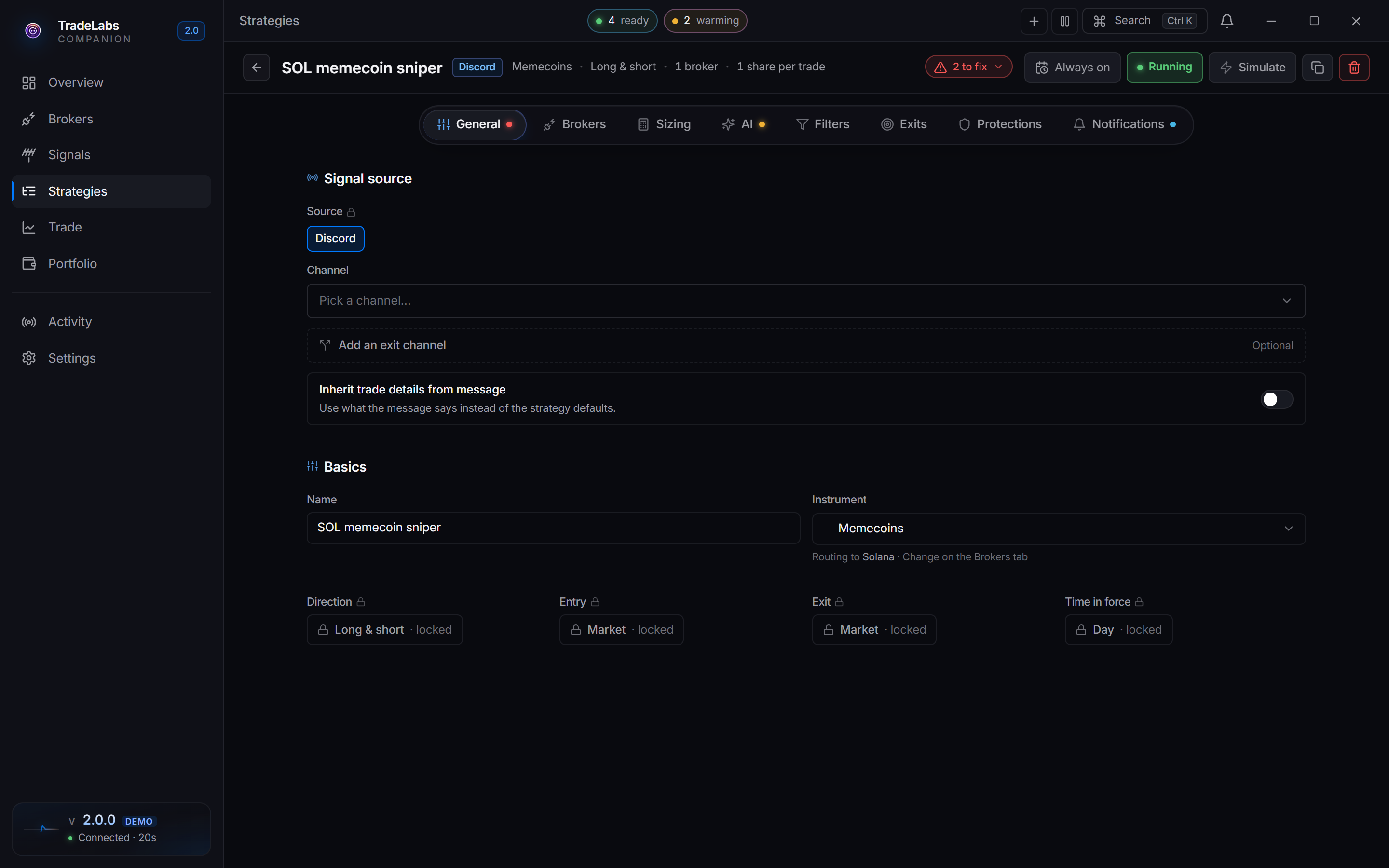
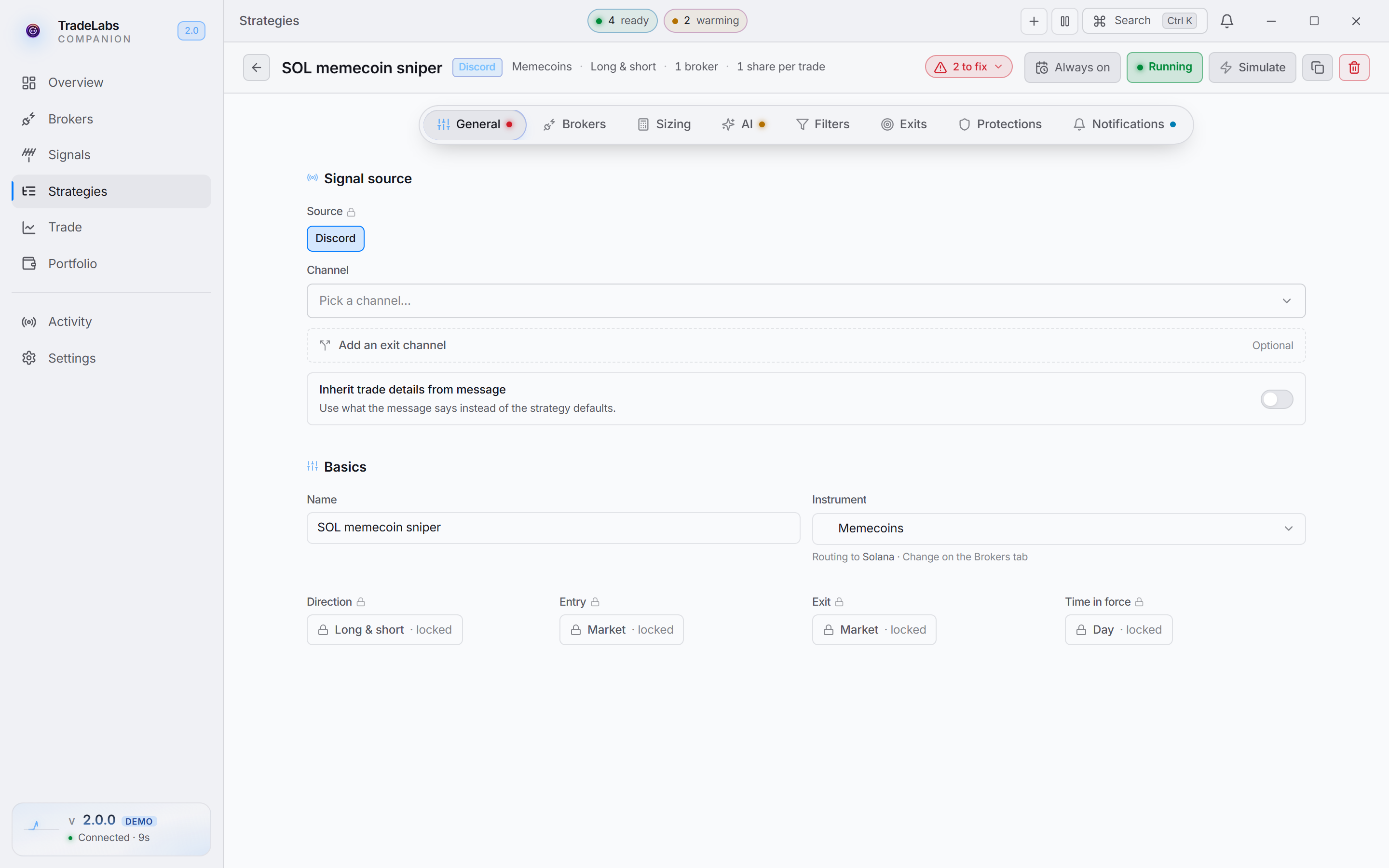 A memecoin strategy in the editor. The swap controls sit on the Sizing tab, and exits get a tab of their own.
What memecoins locks or hides compared with a stocks or options strategy:
| Field | Memecoins behavior |
|---|---|
| Signal source | Discord or Telegram |
| Direction | Locked to Both |
| Ticker | Automatic, set to every coin in the channel |
| Entry and exit method | Fixed to market (swaps are always market) |
| Time in force | Fixed |
| Size unit tabs | Hidden. There is no shares, dollars or percent choice. |
| Risk & exits tab | Replaced by the percent-only Exits tab below |
Because the source is a chat, turn on Inherit trade details from message so the strategy pulls the contract address and direction out of each call. The AI, Filters and Protections tabs still apply, so you can keep keyword filters and duplicate protection. The AI tab is trimmed to AI selling, trim selling, image processing and memory.
Swap controls
The controls for how each order reaches the chain are on the Sizing tab, below the size. Both chains use Slippage tolerance. The other controls differ by chain:
| Chain | Sizing tab controls |
|---|---|
| Solana | Priority fee, Dynamic slippage, Routing method, Dip-buy mode, Retry on RPC timeout |
| Robinhood Chain | Buy size in ETH per wallet, Also buy coins paired with USDG or stock tokens |
The Solana and Robinhood Chain templates give starting values. Robinhood Chain’s controls are explained on the Robinhood Chain page. The Solana controls work like this:
Slippage tolerance
The most the price can move against you between the quote and the fill, as a percent. If it moves more, the swap fails instead of filling at a bad price. Example: 5 allows 5%.
Memecoins move fast. Too little slippage and swaps fail on exactly the coins that are running. Too much and you can fill far above the price you saw. 5% is the default. Fresh pump.fun coins that have not bonded yet often need 10 to 15%.
Dynamic slippage
With it on, Jupiter picks the slippage for each coin based on its pool, up to your Slippage tolerance. Leave it on unless you want the same slippage on every coin.
Priority fee
The tip you pay, in SOL, to get your swap into a Solana block quickly. Too low and the swap sits unconfirmed and never lands.
- 0.001 SOL is a safe starting point, and the editor fills it in when the field is empty.
- Under 0.0005 SOL the editor shows an error. A fee of 0 never lands.
- Raise it when the network is busy and swaps start timing out.
The priority fee is paid on every buy and sell, on top of the network fee, which is another reason to keep at least 0.1 SOL in the wallet.
Routing method
| Option | What it does |
|---|---|
| Auto (default) | Picks the route at swap time. Use this unless you have a reason not to. |
| Jupiter | Aggregates across pools for the best price. |
| Raydium | Goes straight to the coin’s Raydium pool. |
Dip-buy mode
Instead of buying the moment the call arrives, the strategy waits for the price to dip first, then buys.
- Dip %: how far the price has to fall, measured from the price when the call arrived. Example:
10waits for a 10% drop. - Dip timer: how long to wait for the dip, in minutes. The price is checked every 5 seconds.
- If the dip never comes, it still buys. When the timer runs out, the strategy buys at the current price.
- 0 or empty means wait with no time limit. The buy only happens if the dip comes.
Example: Dip % 15 and Dip timer 5. A call comes in at $0.0010. If the coin drops to $0.00085 within 5 minutes, the strategy buys there. If it never drops 15%, it buys at whatever the price is when the 5 minutes end.
The editor labels the Dip timer in seconds, but the broker reads it in minutes. Entering 60 makes the strategy wait up to an hour, not a minute. Enter the number of minutes you want. If Dip % is empty or not between 0 and 99, dip-buy is switched off for that trade and the strategy buys at once.
Retry on RPC timeout
Most swaps do not depend on this setting. The app sends the swap, then rebroadcasts the same signed transaction every couple of seconds until it lands or its blockhash expires, about a minute.
When a swap goes out on the fallback path instead, this setting applies:
- On: wait Retry timeout seconds for confirmation, then send it again, up to 5 attempts. The template uses 10 seconds.
- Off: if confirmation times out, the app checks whether the swap landed anyway, and stops there if it did not.
Leave it on. Timeouts happen when the network is congested or your priority fee is below what others are paying. Raising the priority fee fixes the cause.
Exits
Memecoins get their own Exits tab instead of the shared Risk & exits tab, because an on-chain swap has no broker-side bracket to hang a dollar stop on. Every value is a percentage of your entry price.
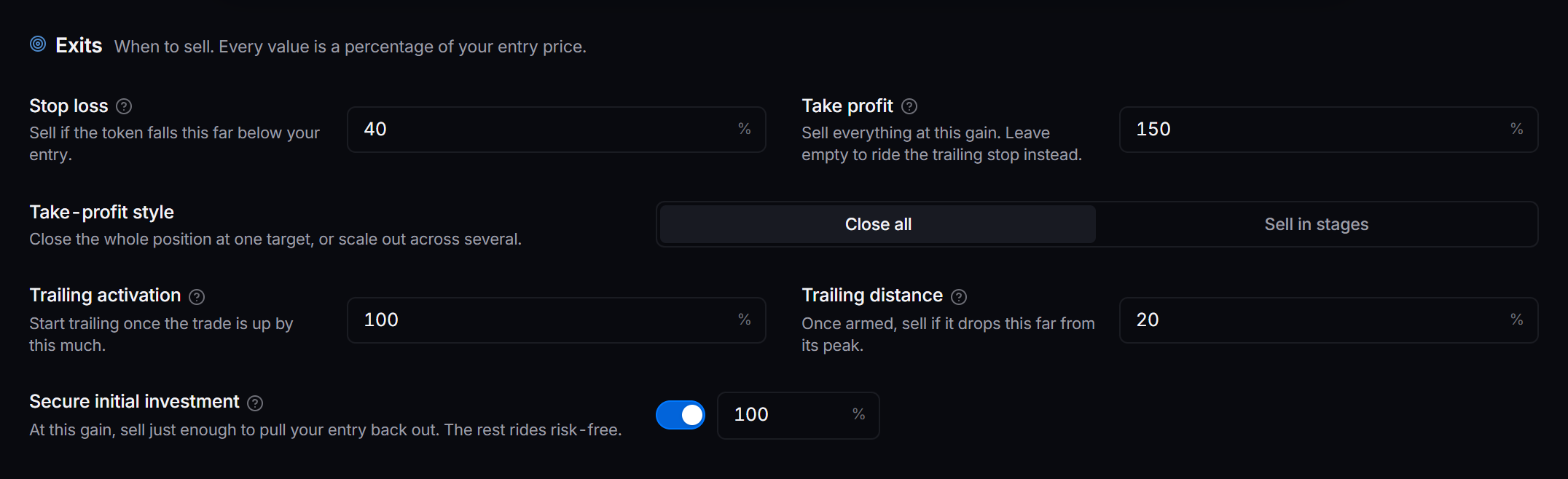
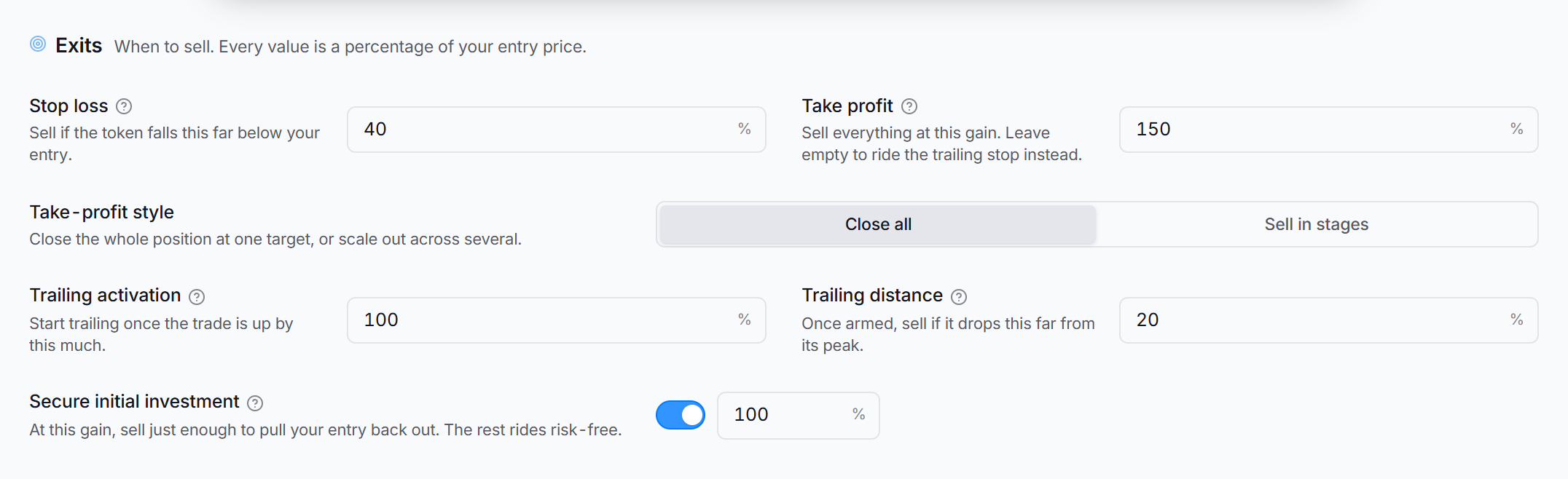 The Exits tab: the level map, then the Protect and Take profit cards.
The tab draws your exits on one gain line, then groups them in two cards. Protect holds the stop loss and the trailing stop. Take profit holds one target or stages, and Secure initial investment. The Strategy Editor explains each field.
The two chains differ in a few exit fields:
- Move stop to entry shows on Robinhood Chain only.
- Start trailing at can stay empty on Robinhood Chain, and the trail starts at once. On Solana, a trailing stop with no start makes the broker refuse the buy.
- The broker in the app watches the exits on both chains. Keep the app running.
The Robinhood Chain template shows how the exits work together on Robinhood Chain.
Protections
Solana. One protection is memecoin-only: Auto position cleanup, which closes the least healthy holdings once you hold more than a set number of memecoin positions at once.
Robinhood Chain. The broker checks two protections for each wallet:
- Duplicate protection: on blocks a repeat buy of the same coin for 2 minutes, counting a buy that is still going through. Off means no duplicate check.
- Double-down protection: on means a wallet does not buy a coin it already holds.
Sells are never blocked by either one.
The order-safety rules that assume a broker order book (anti-stack, cancellation timer, entry delay) are hidden for memecoins. Every coin address is unique, so there is no ticker to stack.
Next steps
- Connect a wallet on the Solana broker page or the Robinhood Chain broker page.
- Start from ready settings with the Solana or Robinhood Chain memecoin template.